
Perplexity vs Claude: where does each work best?
Perplexity vs Claude for research, writing and coding: compare citations, long-context work, plan tiers and ways to keep one brief across both tools.

Perplexity vs Claude is less a contest than a decision about where your work begins. Perplexity works best when you need current, citable facts you can open, faster checks on changes like an API method, and link-backed research across the web. Claude works best for sustained drafting, synthesis across long documents with quoted evidence, and repo-aware, stepwise edits in context through Claude Code. The distinction matters because using one assistant for every stage can add verification work or break continuity, so match the tool to the task and switch as needs change.
Perplexity vs Claude: which for this task?
God of Prompt says Perplexity searches first and writes answers with citations, so each claim can point back to a real page. For long-context work, the same guide shows Claude at its best on sustained writing, reading long documents with quoted evidence, and code through Claude Code. Think of Perplexity as a reading guide with links and Claude as a collaborator that holds a lot of context when you give it real material.
When you need up-to-date, citable facts, start in Perplexity. When you need long-form drafting, document reasoning or repo-aware coding, start in Claude. If you are checking whether an API added a method this month or pulling market stats you can open, Perplexity is faster. If you are turning a rough brief and a long PDF into a clean draft with quotes you can verify, Claude will keep the thread.
Perplexity describes itself as a model aggregator that lets you choose among multiple frontier models. The same page says Claude is built primarily around Anthropic's Claude models in its app. Kevin Welter reports that Perplexity notes a model inside Perplexity can behave differently than in the provider's own app, because it runs with Perplexity's search, prompts and limits. The practical upshot: expect responses in Perplexity to reflect its search and model choice, and expect Claude's app experience to reflect Anthropic's current model generation.
Run trustworthy research with both
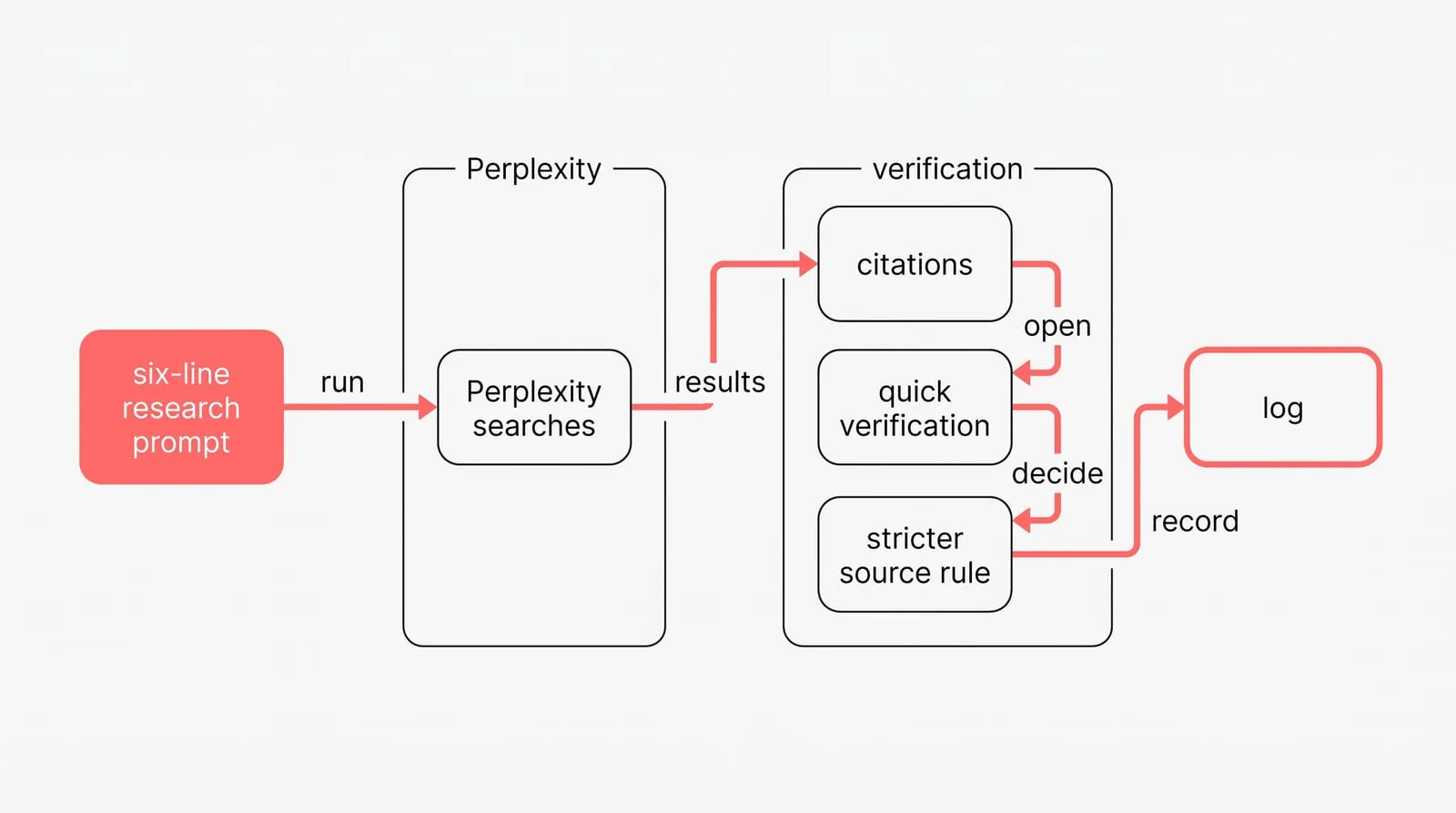
Use the six-line research prompt to make Perplexity searches consistent:
- The question. One scoped question that leads the search. Keep it first; Perplexity builds its searches from your opening line.
- Time window. Limit results to a period so stale sources do not slip in.
- Source rules. State which sources count, for example prefer official documentation and skip aggregator blogs.
- Comparison axes. Name how to compare so the answer lines up across sources.
- Output shape. Say the format you want, such as a compact table with a citation in every cell.
- If sources disagree. Tell the model to show both and flag it when sources conflict.
These six lines follow the prompt structure God of Prompt teaches for Perplexity.
Before you trust a summary, run a quick verification. Open every citation behind any claim you plan to repeat, and check the date. Confirm the page actually supports the claim and watch for circular sources by looking for the primary document underneath. When the first pass leans on secondary pages, rerun with a stricter source rule that allows only primary sources. Keep a log of the prompt, the run date and the links you checked so you can answer where a number came from.
God of Prompt’s Claude guide shows that Claude works best on long material when you attach files and ask for quotes that support each point. fenbs.ai compares Perplexity Spaces, built around real-time web search with citations, with Claude Projects, which emphasize large document context and stable custom instructions. Taken together, long context plus quoted evidence support makes Claude better for traceable synthesis across large document sets.
Writing and coding: when to use each?
To hold a set voice across long pieces, paste two samples you wrote, say what the finished output should look like and ask for the next piece in the same voice. Then steer with short patterns. Start with Ask me first so Claude collects what it needs before drafting, and finish each cycle with Draft, critique, rewrite to improve the result in three passes. Treat the first answer as something to steer. Claude does its best work when you supply real material up front, such as a file, a brief or a rough draft. When a pattern works, save it in a project so the next chat starts where the last one ended. A short rough draft plus one rewrite beats an over-engineered prompt, because separating intent from syntax lets you iterate fast and keeps control when the conversation shifts.
Perplexity vs Claude for coding comes down to where the work happens: for stepwise changes inside a repo, start in Claude Code because it works in the terminal against real files. Claude Code can take you from a quick fix to building a full feature from the terminal. Keep each turn small: name the target file and change, run the command, then review the diff. Use Claude Code for the reasoning and edits, and Perplexity for the openable references that confirm current parameters and deprecations. In the Claude app itself, you can ask for an explanation of an error, a short script or a review of a function, and generated code opens in a side panel you can edit and download.
Switch tools when the need changes: if the next answer must carry citable links, move to Perplexity; if you need a sustained narrative across sections or stepwise code edits in context, move to Claude or Claude Code. Do not hesitate to switch mid-chat: paste a short state-of-play note and your brief, then continue the work in the tool that now fits.
Plans, agents and portable context
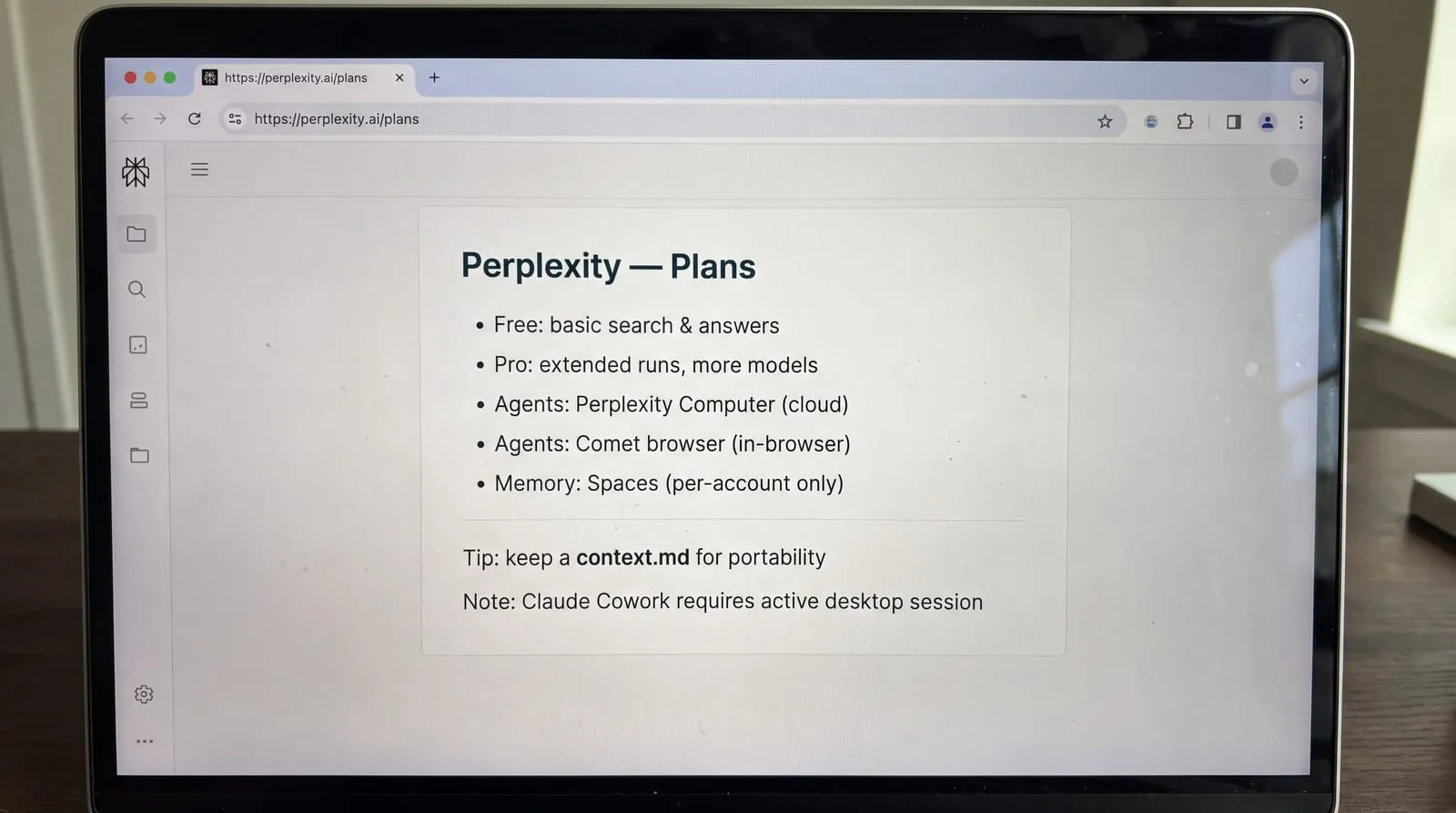
On Perplexity plans, the free tier covers the basics and paid plans add deeper research modes and more model choices. That expansion can matter if you want longer runs or a specific model for a topic. Treat plan names and inclusions as moving parts and check the plan page before you commit.
Perplexity Pro vs Claude Pro is mostly about capacity and allowances, not a different way of working. For Claude, there is a free way to use it and paid plans raise the limits. Allowances change over time on both sides, so upgrade only when a real task hits a limit.
Perplexity’s enterprise comparison names Perplexity Computer and the Comet browser as its agents for automating tasks in the browser. Claude also offers Code and Cowork. On constraints, the same Perplexity page says that for agentic tasks, Claude Cowork requires an active desktop session for work to continue. Computer also runs in an isolated cloud environment and can build documents or apps and run tasks on a schedule. The practical read: choose cloud agents when you want unattended runs; choose Cowork when a desktop session and local file access are part of the job.
Foldery explains that each platform’s memory feature is scoped to its own account: Claude uses Projects and Perplexity uses Spaces, and none of that context carries to another vendor. Fabric’s 2026 comparison adds that neither tool maintains a persistent library across sessions, noting that Perplexity has no session memory and Claude’s context is per project. Because vendor memories stop at account walls and neither keeps a cross-session library, you need to manage context outside the assistants. A portable approach is simple: keep a single context.md you paste when needed, set per-platform custom instructions where they help, keep Projects and Spaces disciplined by workstream, and when you want the same brief carried across tools, use NjectAI.
Pick by task, carry context
Choose from the job in front of you. Start with Perplexity when research needs current, citable facts. Start with Claude when you need sustained drafting, synthesis across supplied documents or code work against real files. Paid tiers mainly expand capacity and available options, so check the current plan pages and upgrade when a real task reaches a limit.
Whichever tool starts the work, keep one brief as the source of truth for your goals, background, files and preferred style. Centralized memory across AI tools beats separate custom instructions because it reduces setup and prevents the context from drifting between chats. Use NjectAI when you want the same profile attached to prompts across supported tools.