
Grok vs Gemini: which suits live X and Google apps?
Compare Grok vs Gemini for live X research, Google apps, tone, media, paid plans and memory, then carry one personal context across both and verify it.
A Grok vs Gemini choice is really a choice between workflows: use Grok for live X signal, and use Gemini for synthesis across the web and work already living in Google apps. The harder question is how to judge either output without trading speed for confidence, then preserve your preferences when you switch. Clear source rules, links you can open and a portable set of personal details make the comparison practical across research, writing, media tasks and daily work.
Grok vs Gemini: when to use each?
In Grok vs Gemini decisions, pick Grok when you need the minute‑to‑minute pulse on X. God of Prompt says Grok’s distinctive edge is live access to X posts, so use it when you want what people said this hour and links to the posts behind the claim. It pays off only with retrieval‑aware prompts: set a time window, tighten the source rules and ask for links, or you get a vague summary. Mode names and the depth of web and X access change by mode and plan, so check what your plan exposes before you rely on one workflow.
Use the six‑line research prompt to keep Grok on task: The question, Time window, Source rules, Comparison axes, Output shape, If sources disagree. For Grok, make the clock strict (for example, last 24 hours), set a concrete source filter (for example, public posts with a replies minimum) and demand links so you can verify fast. Always include a time window, or Grok may mix an old post with this morning’s chatter. On quiet, niche topics, ask Grok to say when the sample is small or switch to a mode that searches the wider web.
Use Gemini when you need synthesis across the broader web or to work inside Gmail, Docs and Drive. Gemini is available in Gmail and Docs. In Google Search’s AI Mode, Deep Search browses hundreds of sites for deeper answers, and Deep Research can automatically browse and analyze hundreds of websites in real time to produce research reports. So when you want grounded synthesis across web pages, start here and open the cited pages you plan to use.
A one‑shot Grok prompt that stays current and checkable:
Find the strongest claims about your product’s announcement. Last 24 hours only. From public X posts with 50+ replies; exclude official brand and major news accounts. Compare the claims by the evidence offered and the reply count; quote each post with its handle, timestamp and a link. Return a table with columns: claim, handle, replies, link. If posts disagree, show both sides and mark what is disputed.
Open the first two links it cites and check that the quoted lines appear and the counts match; if both hold and the posts are central to the conversation, the summary is grounded. If they do not, adjust: raise the replies threshold to cut noise, lower it if you see only press accounts, or widen the window if volume is too low. A summary without links is an opinion, so ask for links every time.
Tone and multimodal differences
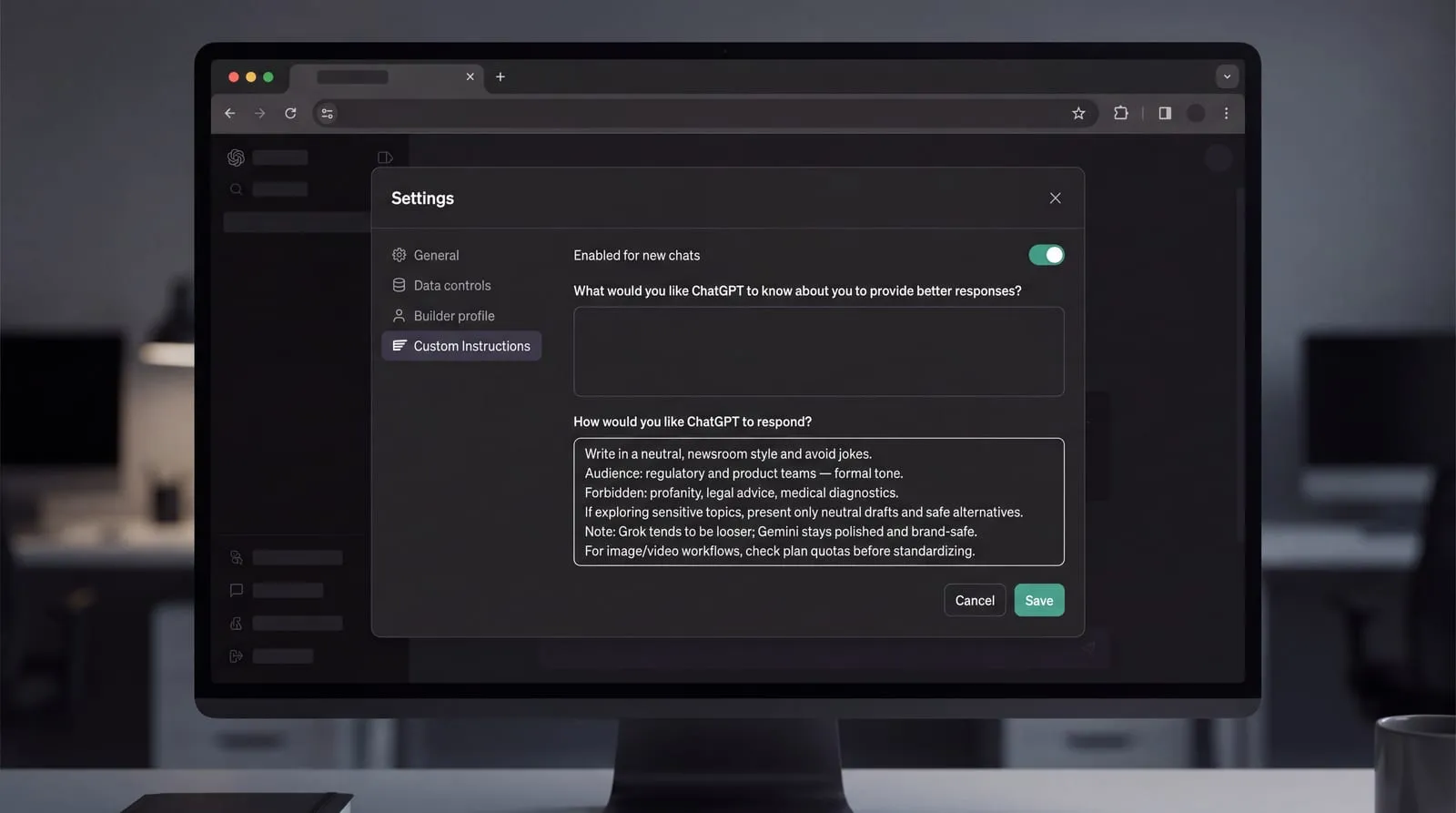
Lead with one explicit line that sets the register, for example: “Write in a neutral, newsroom style and avoid jokes.” Grok’s default voice is looser than the other models, so a tone line keeps it, and Gemini, on brief for regulated copy and formal docs. Make that line do your brand’s work: name the audience, level of formality and any red lines on topics or wording, then move straight to the task.
VersusTools reports that Grok is more willing on spicy or edge prompts, while Gemini tends to stay polished and brand-safe. If you must explore a sensitive area, add your own guardrails: state what is out of scope, require neutral wording, and ask for safe alternatives. If you need an edgier brainstorm, say so in the tone line and keep the output as drafts. Treat refusals and safety boundaries as moving targets; vendors adjust them, so keep the register explicit and be ready to rerun with a milder or stronger line.
The UK Post notes that Grok Imagine creates images and video. Google’s plan page shows image generation on every plan and access to video generation in Gemini and Google Flow, with higher tiers raising access and with availability varying by country. For any media workflow, check plan quotas before you standardize.
What do paid plans add and cost?
Gemini vs Grok at a glance means comparing the consumer plan ladders and what each unlocks. SpaceXSI Docs lists current The X Subscription prices and tiers. It also notes Grok Bot is included on Premium and up and that usage draws from a shared pool across Grok and Cursor. Google’s plan page shows monthly prices, storage and selected benefits for Google AI Plus, Pro and Ultra.
| Service | Plan | Monthly | Included usage/storage | Notable inclusions |
|---|---|---|---|---|
| The X Subscription | Plus | $8/mo | Base | No Grok Bot |
| The X Subscription | Premium | $30/mo | 4x | Grok Bot included; Shared pool across Grok and Cursor |
| The X Subscription | Super | $100/mo | 15x | Grok Bot included; Shared pool across Grok and Cursor |
| The X Subscription | Ultra | $200/mo | 50x | Grok Bot included; Shared pool across Grok and Cursor |
| Google AI | Plus | $4.99/mo | 400 GB storage | Gemini in Google apps; Video generation in Gemini and Google Flow |
| Google AI | Pro | $19.99/mo | 5 TB storage | Gemini in Gmail, Docs, and more; Deep Search in AI Mode (US) |
| Google AI | Ultra 5x | $99.99/mo | 20 TB storage | YouTube Premium Family included; Higher model access |
| Google AI | Ultra 20x | $199.99/mo | 30 TB storage | YouTube Premium Family included; Video generation in Gemini and Google Flow |
Names, limits and quotas change. SpaceXSI Docs points you to x.ai/pricing for current prices and included usage; confirm inclusions on official plan pages before you build a workflow around them.
Choose tiers by the workflow you refuse to leave: if live X signal and Grok Bot access anchor your day, climb The X Subscription to the level that covers that usage; if your work lives in Gmail, Docs and Drive and you need storage and Search features, pick the Google AI tier that matches those needs.
Memory and one portable context
Google's help page says Gemini Apps can personalize responses using memory of your past chats when you are signed in with a personal Google Account and are 18 or over. You can turn Memory on or off in Settings, and it is not available in certain features such as Gems or Live chats. If Memory is unavailable for your account or task, use the portable context method below.
Dirty Static's tutorial builds one master file with six sections and moves it in five steps:
- Build and name the sections: Role and Context; Active Projects; People and Terms; How to Answer Me; Facts to Remember; Never Assume.
- Extract from your current assistant, paste into the file, and clean out stale or sensitive lines.
- In Gemini, use Settings > Import memory to Gemini, paste the generated response and click Add memory; Google's Gemini Apps Help limits this to personal accounts, age 18 or over, and excludes the EEA, Switzerland, the UK and some Gemini surfaces.
- In Grok, seed a fresh chat by pasting short slices of the file; personalization relies on conversation history.
- Verify the move by starting a new chat and asking three questions: one about your role, one about a named project, and one that tests a tone rule; compare the answers to your file.
Dirty Static reports that Grok personalization rests on conversation history with no memory panel to audit, so a correct echo in a new chat is only a receipt. Because Gemini can import memory while Grok lacks an auditable memory, a portable file is the practical way to share personalization across both.
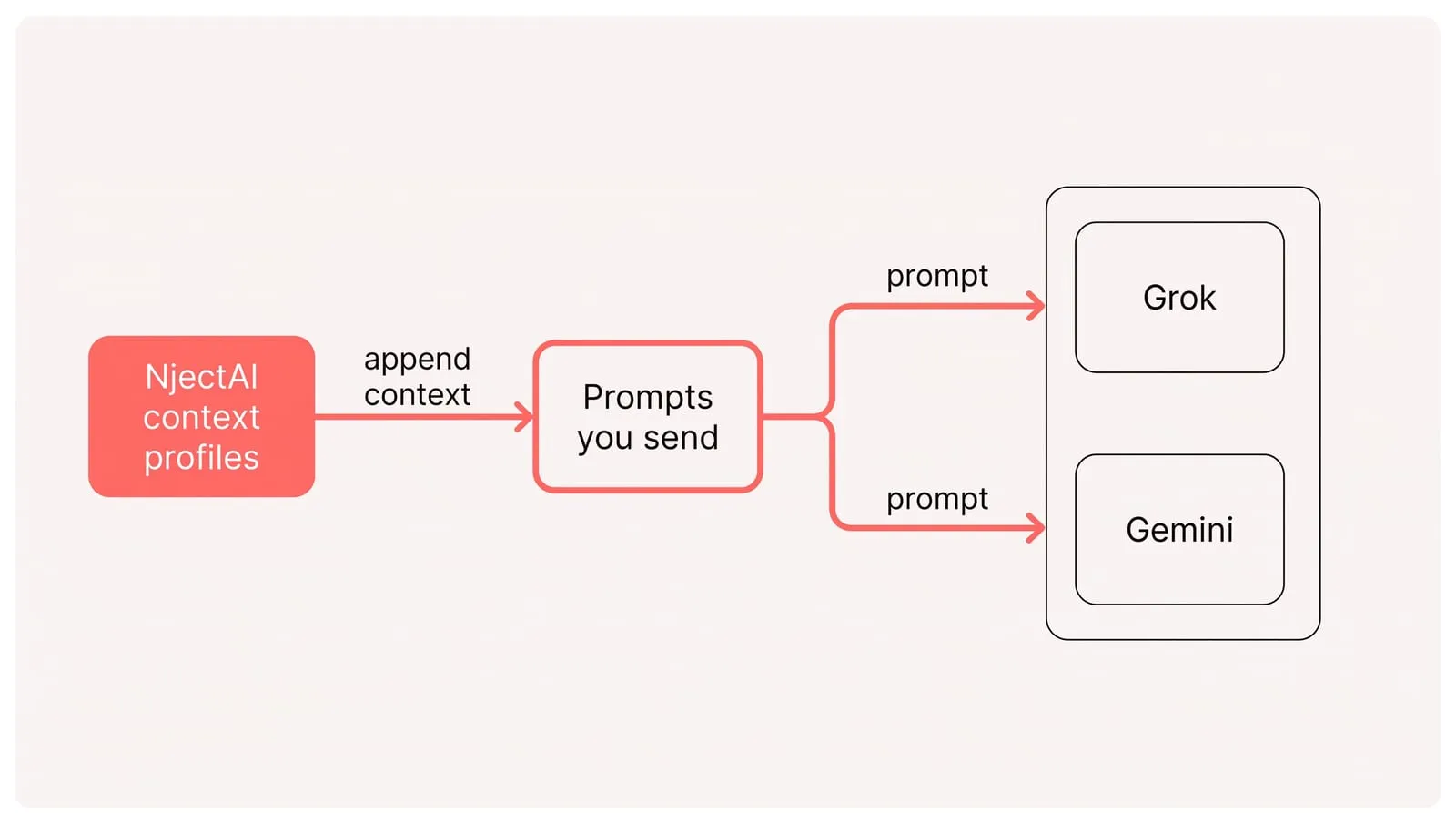
Use NjectAI context profiles to store your role, projects, terms and tone once, and inject them into prompts you send to Grok and Gemini. Prefer structured context appended to each message over long opening monologues, because visible, labeled background is debuggable, portable across models and keeps your prompt short.
Pick by job, carry one context
Treat the choice as job routing rather than picking a permanent winner. Grok is the stronger starting point for live X signal; Gemini fits broader indexed synthesis and work tied to Google apps. In both, narrow the time window and source rules, then open the links behind consequential claims. Checkable evidence matters more than the fastest answer.
Continuity comes from controlling the context yourself. Keep the same current details in a portable file, or use the NjectAI profile option described above, and test a fresh chat with questions about your role, project and tone. Keep one context set per job or audience. Focused sets exclude irrelevant background; switching between them works better than one bloated prompt that talks past the task.