
AI memory explained: layers, limits and one portable context
Understand AI memory across ChatGPT, Claude and Gemini, then learn to audit stale details and carry one stable context between AI assistants.
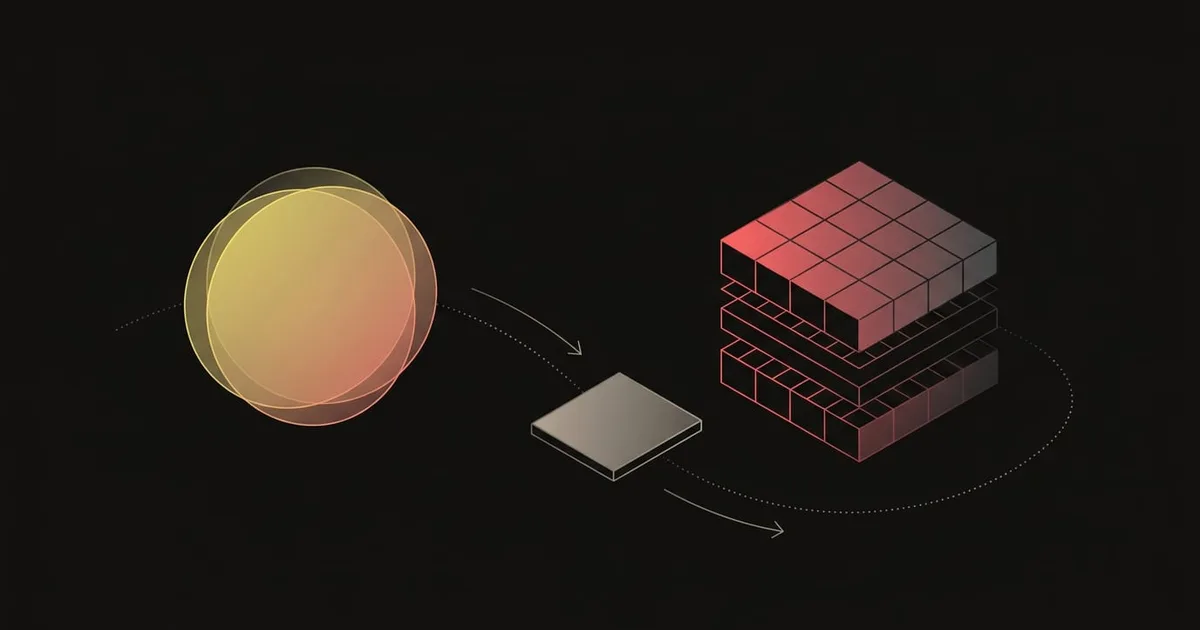
AI memory can feel inconsistent because ChatGPT, Claude and Gemini retain different information, under different settings, and only within their own products. A detail that shapes one conversation may be absent from the next tool, while an outdated preference can keep influencing answers after your work has changed. The useful response is to separate what the model sees now from what the platform stores and what you control. That perspective makes it easier to audit drift, correct stale context and carry a stable working profile between assistants.
What are the three layers of AI memory?
You can think about AI memory in three distinct operational layers:
- Context window: the model's working memory for the active turn. It holds the text currently being processed, such as recent messages, system prompts, and tool outputs. When this window reaches capacity, older text falls out or gets summarized.
- In-product memory: facts, instructions, and preferences that a specific platform stores on your behalf. The tool pulls these records into future prompts so the model behaves consistently across separate chats.
- Portable context you control: a structured profile you maintain outside any single platform. It separates enduring facts about your role from short-term priorities, allowing you to establish the exact same starting point wherever you work.
The context window is the model's immediate working memory. It holds only a bounded amount of text during a turn. Once that limit is reached, earlier conversation turns are truncated or compressed into summaries. That compression often drops precise details such as project deadlines, numeric parameters, or edge cases. Long threads gradually lose precision, which makes scoping conversations to specific goals or restating critical constraints necessary.
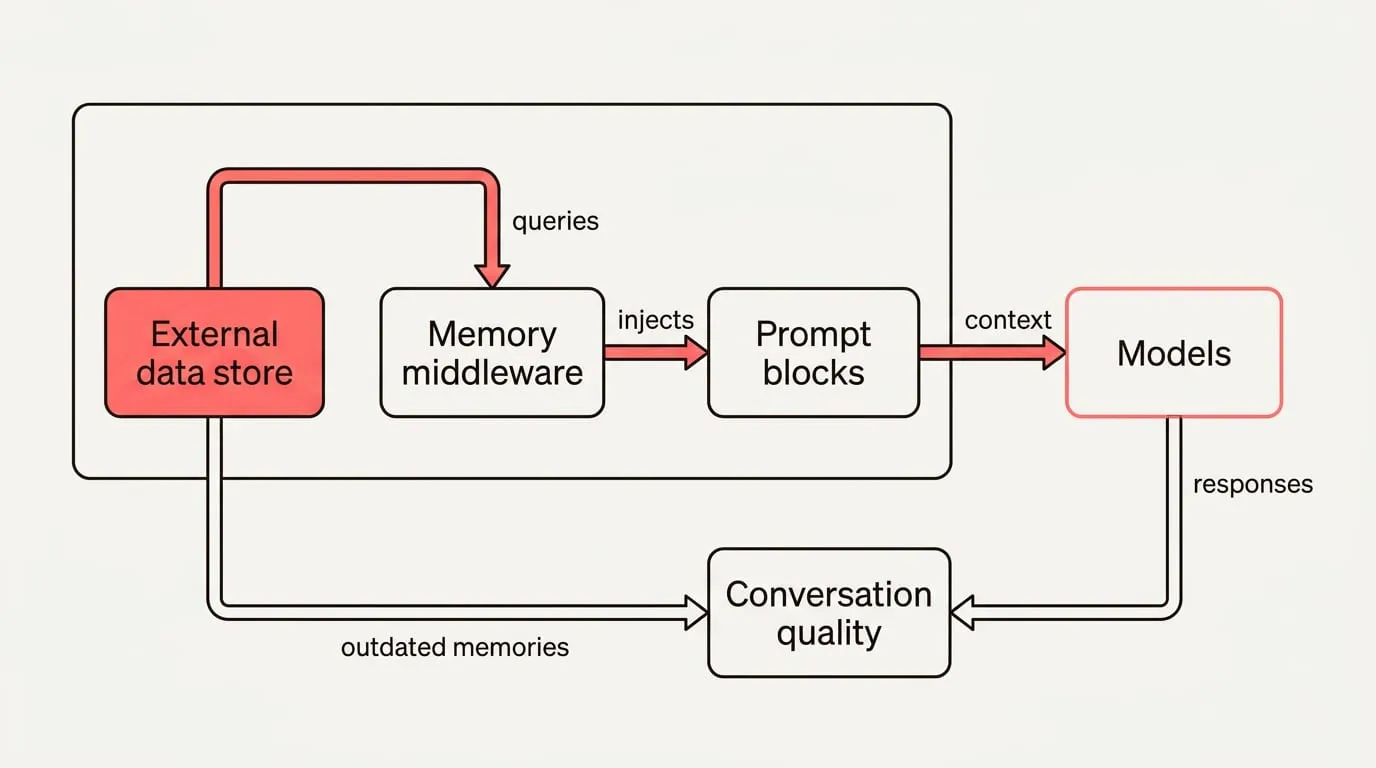
When people talk about LLM memory or AI assistant memory, they usually mean in-product memory. This information does not modify underlying model weights. Instead, external middleware retrieves stored records and injects them into the prompt before generation begins. TanStack's documentation describes a memory middleware that recalls relevant items and adds them to the system prompts before the model runs, then saves the finished turn for later use. Because this context is retrieved dynamically at generation time, updates take effect on your next query.
How major assistants handle memory and where it breaks
ChatGPT memory draws on several internal stores. OpenAI Help Center explains that, when Memory is on, ChatGPT can use past chats, saved memories, custom instructions, saved files and content from connected apps, and it provides a memory summary plus controls to ask what it remembers, correct entries, or delete remembered information. The documentation notes that deleting a chat does not automatically remove a separate saved memory created from that chat, and choosing Don't mention this again reduces future references without deleting the underlying source. These features can vary by plan, region, platform and workspace settings.
Claude and Gemini take different approaches to managing continuity. Claude keeps an editable memory summary alongside Projects that scope context to one piece of work, while Gemini builds personal context from past chats and, where connected, Google Workspace. Feature names, regional access, and administrative defaults differ depending on whether you use a personal, team, or enterprise workspace. Because these capabilities change across subscription tiers, you must check your account settings to see whether profile preferences or project scopes apply to a given conversation.
Memory does not travel between these tools because personalization is completely external to the underlying models. TanStack documentation illustrates that memory middleware queries an external data store during recall and injects relevant context into prompt blocks before generation begins. Each vendor operates an isolated external database. Nothing you discuss with ChatGPT updates model weights, meaning Claude or Gemini cannot access facts recorded in a separate product.
When memory drifts without maintenance, old records actively degrade conversation quality. An EMNLP 2022 study by NAVER CLOVA found that outdated or contradictory memories reduce quality in long-term conversations, and that selectively updating and pruning them outperformed simply accumulating everything across sessions, especially in later sessions. When a system merely piles up past turns, obsolete details linger. If an assistant remembers an abandoned requirement alongside its replacement, conflicting instructions produce repeated errors and answers that feel inconsistent.
Learn With Param notes why shoving full histories into the prompt fails: context windows fill fast and old context can contradict current instructions, so agents should store structured facts and recall only what is relevant. In their engineering pattern, a short session recap is retrieved only on explicit continuity cues and is capped to the most recent sessions. Truncating transcripts and scoping facts to specific projects prevents irrelevant conventions from polluting active work, so rules from one codebase do not spill into another.
How do you audit, correct and keep memory clean?
To audit the active context an assistant holds about you, execute these steps:
- Ask the assistant directly what it believes is true. AI Work Commons suggests asking "What do you remember about me?" as a fast baseline.
- Inspect the product's memory management interface or profile view and compare the listed items against your actual current requirements.
- Flag stale milestones, contradictory conventions, or sensitive operational details that should not persist across sessions.
- Use temporary or incognito chat modes whenever working with confidential or throwaway topics. AI Work Commons advises reviewing what your tool remembers, deleting wrong or sensitive items, and using a temporary or incognito chat when you do not want information carried forward.
In ChatGPT, open Settings, select Personalization, and open the Memory Summary. OpenAI Help Center says you can correct entries, choose Don't mention this again, or Delete and turn off memory in the memory summary. Choosing Don't mention this again reduces future references while keeping source records intact. If you choose Delete and turn off memory, the tool clears the remembered summary, but Delete and turn off memory does not delete past chats, which remain in your history unless explicitly removed.
When an assistant repeats an incorrect or outdated fact, apply this systematic correction procedure:
- Locate the erroneous record and cite the correction clearly. AGNT recommends writing a new record that supersedes the old entry.
- Mark the previous entry as superseded in the system so it remains accessible for historical provenance without being retrieved during normal generation.
- Re-index any vector retrieval databases or search indexes that reference the old text to prevent stale embeddings from resurfacing.
- Rerun the task that failed to verify that the model's output reflects the updated constraint.
- Works With Agents advises saving the correction as a durable memory entry immediately so you do not repeat the same fix next session.
For high-value tasks, Gemora recommends a pre-answer check: ask the model to summarize the relevant context it believes is currently true before it answers. Once the model confirms its premises, evaluate whether the query requires summary memory or exact record history. Durable memory suits enduring constraints and preferred communication styles. Gemora advises that you use retrieval when you need exact wording or the original reasoning from prior conversations, rather than relying on compressed memory alone.
Keep one context across assistants
Gemora outlines a four-layer personal context architecture that you can maintain as a clean document outside any single tool:
- Stable section: your professional role, persistent technical constraints, language requirements, and preferred formatting rules.
- Active section: immediate project priorities, active sprint milestones, and constraints valid only for the current month.
- Source history pointer: direct references to canonical project documentation, repository locations, or key conversation transcripts.
- Portable summary: a concise, plain-text block summarizing the sections above, formatted to be pasted directly into a new chat.
To keep this context synchronized across every assistant you use, follow this weekly maintenance sequence:
- Update the active section in your primary document with current sprint milestones and completed objectives.
- Paste the updated portable summary into each tool when opening a new project thread for the week.
- Run a verification prompt asking the model to summarize its understanding of active constraints before generating work.
- Correct any misremembered or outdated details immediately in the thread.
- Record any confirmed operational changes back into your master document so every assistant benefits from the correction.
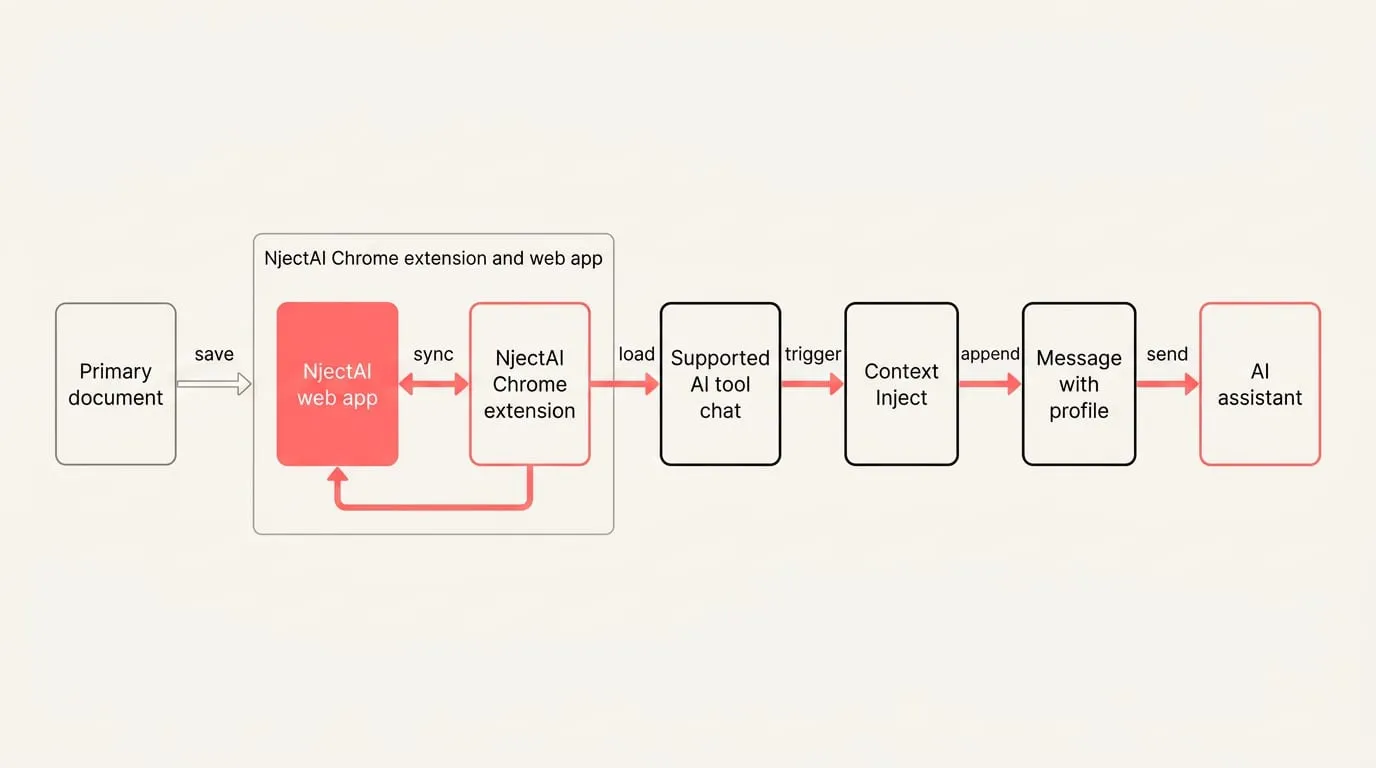
Where NjectAI helps is in automating this routine across your browser. By storing context profiles in the NjectAI Chrome extension and web app, you can inject your saved background, project constraints, and files into prompts across ChatGPT, Claude, and Gemini. Context Inject appends your selected profile to your prompt when you send a message, keeping your working environment consistent without changing the vendor-stored memories inside each platform.
Make context a habit
Reliable continuity comes from treating memory as three layers with different owners and limits. The context window supports the current exchange, each platform manages its own stored personalization, and your portable context provides the shared source you can inspect and update. Keeping those roles separate makes stale or conflicting details easier to find instead of assuming every assistant knows the same facts.
For important work, confirm the active premises before requesting the answer, then correct both the conversation and your portable source when they have drifted. Vendor memories remain separate, while your portable source gives ChatGPT, Claude and Gemini a consistent starting point. You can change tools with less repeated setup while retaining control over which durable facts, current priorities and source references enter the prompt.