
Context engineering for everyday AI
Context engineering helps you package and reuse project facts, constraints and examples across ChatGPT, Claude and Gemini while reducing repeated setup.
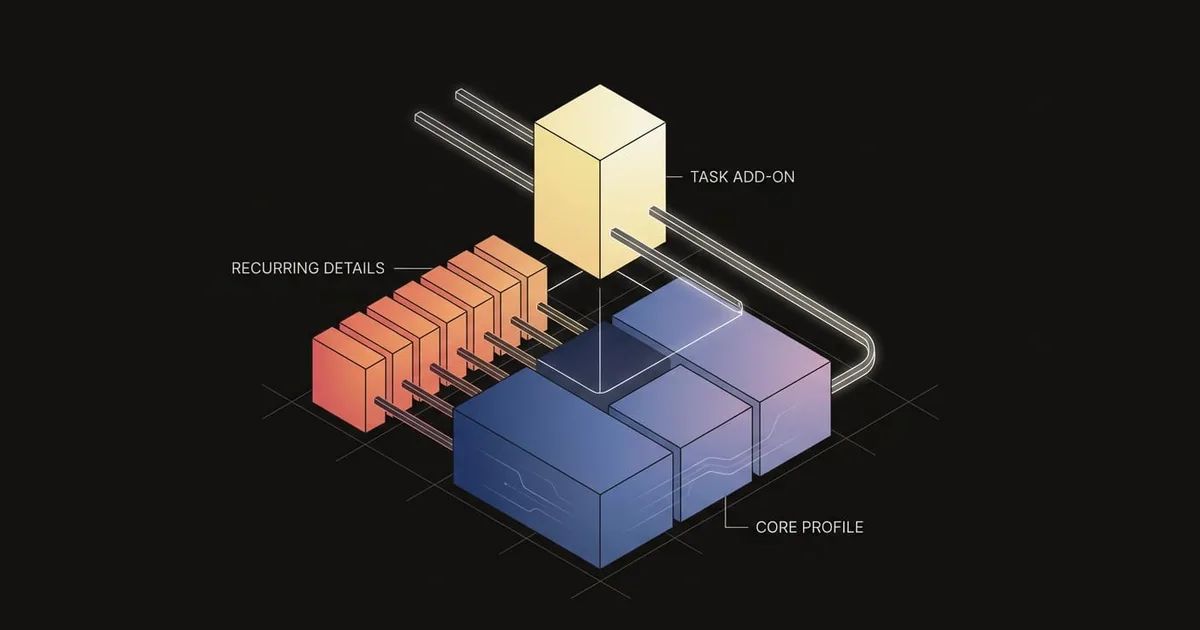
When daily AI work depends on repeatedly pasting your role, project background and formatting rules, small omissions can produce uneven answers. Context engineering gives you a more deliberate approach: decide which facts matter for the current task, package recurring details once, and add heavier references only when they become relevant. You can then place that material in ChatGPT, Claude or Gemini features, or keep a portable profile for use across them. The result is a clearer working setup with less retyping and fewer opportunities for essential constraints to disappear.
What is context engineering?
Context engineering is the practice of choosing and maintaining the information the model will see before it answers. Context engineering vs prompt engineering comes down to scope: curating what information enters the window versus phrasing the instruction. Anthropic (2025) describes it as curating and maintaining the optimal set of tokens the model sees at inference, while prompt engineering focuses on writing and organizing instructions. In their framing, context is the set of tokens included when sampling from an LLM. In everyday chats, you use prompt engineering to craft direct instructions, define tone, and format the immediate request. You use context engineering to select the project facts, examples, constraints, and conversational history the model should consider for each turn. Rather than rewriting prompts repeatedly, you curate the exact working state available during inference.
Two technical limits explain why selection beats stuffing all available text into a single prompt. Anthropic reports context rot: as you add more tokens to the window, the model's ability to recall the right detail tends to drop. This degradation emerges across models because LLMs operate on a finite attention budget. Under the hood, the transformer forces every token to attend to every other token, creating roughly n squared pairwise relationships, and most training examples are shorter sequences, so models have less practice with long-range dependencies; together this creates an attention budget and reduced precision at very long contexts. As context length grows, the model's capacity to track those pairwise relationships stretches thin. Instead of hitting an abrupt cutoff, performance drops along a gradual gradient, leading to lower precision during detailed retrieval.
Context engineering AI boils down to this rule of thumb: edit the prompt to change phrasing or tone; engineer context to decide what the model sees next. When a response misses required background or relies on outdated project assumptions, adjust the reference material you surface. If the output is structurally wrong, change the inputs the model sees. If the tone or phrasing is off, adjust your prompt instruction.
Prepare and structure your context
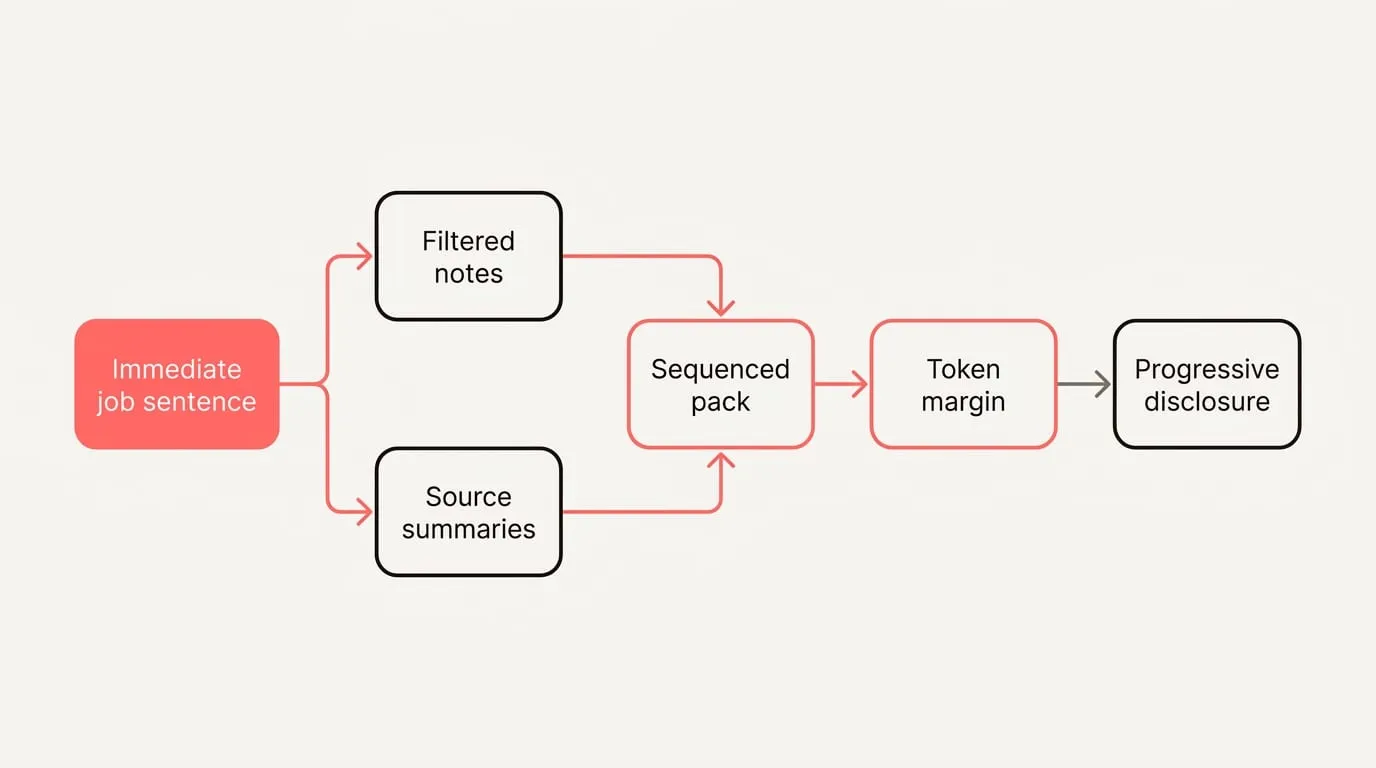
A compact context pack has five parts. Each gives the model a distinct signal it will use in its next decision:
- Who you are and preferences: Your role, audience, tone, and specific style rules to establish an operating voice.
- Project objective: A concise definition of the immediate goal, scope boundaries, and core criteria for success.
- Constraints and resources: Explicit policies, deadlines, permitted sources, and boundaries on tool execution.
- Canonical examples: Two or three high-quality reference snippets that illustrate expected structure and tone.
- Desired output format: Concrete layout specifications, such as structured markdown tables, bullet counts, or schemas.
Build and stage your context with progressive disclosure. Anthropic advises treating context as a finite resource with an attention budget and to curate the smallest set of high-signal tokens you can.
Follow these steps to assemble and stage your material cleanly:
- Define the immediate job and required deliverables in a single sentence.
- Filter notes to isolate high-signal facts that directly alter decisions, setting aside general narrative.
- Summarize heavy source documents into concise bullet points, reserving verbatim excerpts only for mandatory citations.
- Sequence the pack logically: task statement first, followed by constraints, canonical examples, and format rules.
- Reserve a dedicated token margin for the model response by pruning unneeded contextual setup.
- Anthropic describes using progressive disclosure to load the right context at the right times, so keep opening prompts lean and supply reference texts only when requested.
- Demarcate distinct sections with clear structural headers such as Constraints, Examples, and Output.
- Inspect the compiled text to eliminate conflicting guidelines and contradictory instructions before sending.
In 2023, Anthropic reported that extracting relevant quotes before answering and adding dynamic, contextual examples improved long context recall on 70K and 95K token documents. They also observed that performance at the very end of the document can be degraded when you add examples, so put instructions at the end of the prompt. Generic examples on external knowledge did not seem to help.
Suppose you need a 200-word announcement email for an analytics feature. In message one, establish the baseline: Role: SaaS product manager writing for administrators. Objective: Announce Usage Analytics 2.0 and prompt trial activations. Constraints: No unreleased roadmap mentions, no competitor comparisons, plain tone. Format: Subject line, preview snippet, two short body paragraphs, and a call-to-action link. If the initial draft requires technical grounding, supply references in message two: 'The new dashboard tracks active seats weekly and monthly with plan filters, and administrators can export CSV summaries directly to billing.'
Overstuffed, brittle system prompts are a common failure. Anthropic’s right altitude guidance warns that hardcoded, brittle logic in system prompts creates fragility, while vague, high level guidance gives too little signal; aim for specific yet flexible instructions. They also advise striving for the minimal set of information that fully outlines the expected behavior. In practice, keep rules that change decisions, remove the rest, and push long references and edge cases to later turns when the model actually needs them.
How can you reuse context?
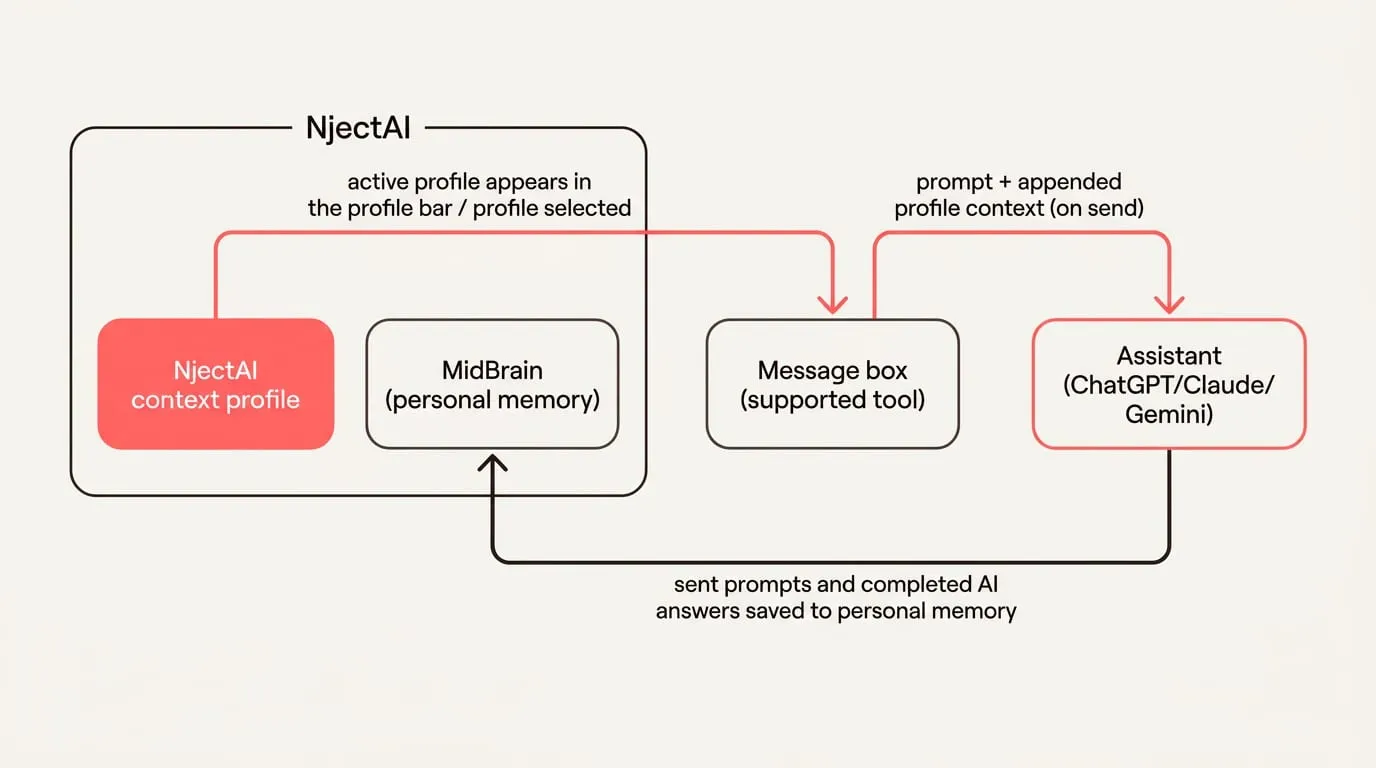
Context engineering sessions memory provides the layer that persists user instructions across individual conversations. Major platforms store this data in specific environments:
- ChatGPT: AI Academy by Anthropos lists Custom Instructions in ChatGPT as a place to persist your preferences across chats.
- Claude: Anthropic’s Claude guide says much of your context can be assembled from the system prompt, Skills, CLAUDE.md files, and memory. Claude now has memory, artifacts, and skills that can load and share context across sessions. AI Academy by Anthropos presents Claude Projects as scoped workspaces between global defaults and a single chat.
- Gemini: Gemini Gems are a reusable layer for guidance alongside product preferences.
Andy Bromberg explains that memory lives at the application layer and does not travel across assistants; the app retrieves relevant memories and attaches them to the request before sending it to the model. In practice, this means a memory you saved in one product will be used only when that product includes it in the next call.
To maintain unified parameters across multiple providers without retyping, set up an NjectAI context profile:
- Install the NjectAI Chrome extension from the Chrome Web Store and sign in to the web application.
- Create a context profile in the web app by completing the short setup interview and optionally attaching recurring reference documents.
- Navigate to a supported tool such as ChatGPT, Claude, or Gemini, start a new conversation, and verify your active profile in the profile bar.
- Enter your prompt text. Optionally click Improve your prompt to let NjectAI rewrite your draft in place for your review before dispatching.
- Click Context Inject to stage your profile context so it appends to your prompt payload upon submission.
- Continue standard conversational work; sent prompts and completed model outputs are indexed to personal memory for future injection runs.
Choose the reuse option that matches your setup requirements and cross-platform needs:
| Option | Setup Time | Applies Where | Portability | Best When |
|---|---|---|---|---|
| Pasteable templates | Minimal | Directly in any active input box | High across all applications | Running isolated one-off queries |
| Native platform memory | A few minutes | Confined to a single provider account | Low across different assistants | Working exclusively within one model ecosystem |
| NjectAI context profiles | One-time setup | Supported web interfaces in Chrome | High across supported AI models | Maintaining consistent context across multiple assistants |
Keep context effective over time
AI agent memory helps long-horizon, tool-using workflows keep state outside a single chat. For everyday chats, keep your checks and fixes lightweight:
- Track efficiency metrics: Monitor first-attempt task completion, the frequency of required follow-up corrections, and prompt re-ask counts to identify context drift.
- Mitigate distraction: When responses include irrelevant details, prune conversational logs, summarize extensive documentation into key points, and defer secondary examples.
- Resolve conflicting guidelines: Remove obsolete rules, designate a single authoritative source for disputed definitions, and specify precedence explicitly.
- Prevent context contamination: Clearly delineate untrusted external reference material from core instructions, noting origin and authenticity.
- Anthropic defines agents as LLMs autonomously using tools in a loop. For complex operations, Use compaction to summarize the conversation near the context window limit and start a new context, and deploy structured note-taking (agentic memory) that stores notes outside the context window and pulls them back in later.
Design the input, not just the prompt
Reliable everyday AI use starts with treating the model’s attention as limited and giving each task the smallest useful set of background, constraints, examples and output rules. A compact context pack makes those decisions explicit. Staging long references only when they become relevant keeps the working material focused, while prompt edits can handle the immediate wording, tone and format.
Reuse depends on where that pack lives. Native instructions, memory and project features can carry context within their own assistants, while a pasteable template or portable profile can keep the same baseline available across ChatGPT, Claude and Gemini. This separation gives you a practical way to reduce repeated setup and improve the odds of a useful first response: maintain stable context once, then adjust only what the current task requires.