
Few shot prompting: how many examples do you need?
Few shot prompting made practical: choose three to five useful examples, format them consistently, test common failures and reuse one scaffold across AI tools.

Few shot prompting is most useful when a clear request still leaves too much room for variation in structure, labels or tone. The challenge is choosing examples that demonstrate the desired pattern without adding noise or consuming unnecessary context. For many routine classification, extraction and rewriting tasks, start with three to five concise, realistic examples in a consistent scaffold. Then test the same cases, adjust the set when outputs drift, and keep the prompt portable across ChatGPT, Claude and Gemini.
Few-shot vs zero-shot vs one-shot: when to use each?
God of Prompt explains that few-shot prompting means placing a few input→output examples inside your prompt so the model follows the pattern, and you are not training the model. The examples show what “good” looks like: by seeing a handful of pairs, the model infers the labels to use, the structure to return, what to ignore and how to phrase the answer. That is why examples are the most direct way to steer format and tone without code or fine-tuning. Zero-shot prompting is asking with no examples; one-shot prompting gives a single seed example. You will choose among the three based on how much structure and consistency the task needs.
When to use each approach, plus what you give the model:
| Approach | When it fits | What you provide | Typical targets |
|---|---|---|---|
| Zero-shot | Straightforward general knowledge or definitional questions where broad world knowledge suffices. | Zero-shot means no examples. | Quick lookups, short factual summaries, basic translations. |
| One-shot | A simple task where one seed fixes layout or delimiter choices. | One-shot means one example. | Short transformations, a single structured record, a compact template. |
| Few-shot | You need tight consistency of format, tone or scope; classification/extraction/style tasks that benefit from a clear pattern. | Few-shot means a few examples; best for consistent format or tone. | Data formatting, sentiment or tone analysis, brand voice matching. |
Anthropic’s best practices recommend separating the parts with XML-like tags, so a compact scaffold many models follow looks like this:
- <instructions> State the goal, the few hard rules, and the exact output format to return. </instructions>
- <examples> Include multiple <example> items that mirror real inputs and outputs. </examples>
- <input> or <task> Paste the new case here, separate from examples and instructions. </input>
- Optionally name the answer block, for example: <answer> Return only this block in the final output. </answer>
Choose and format examples for stable prompts
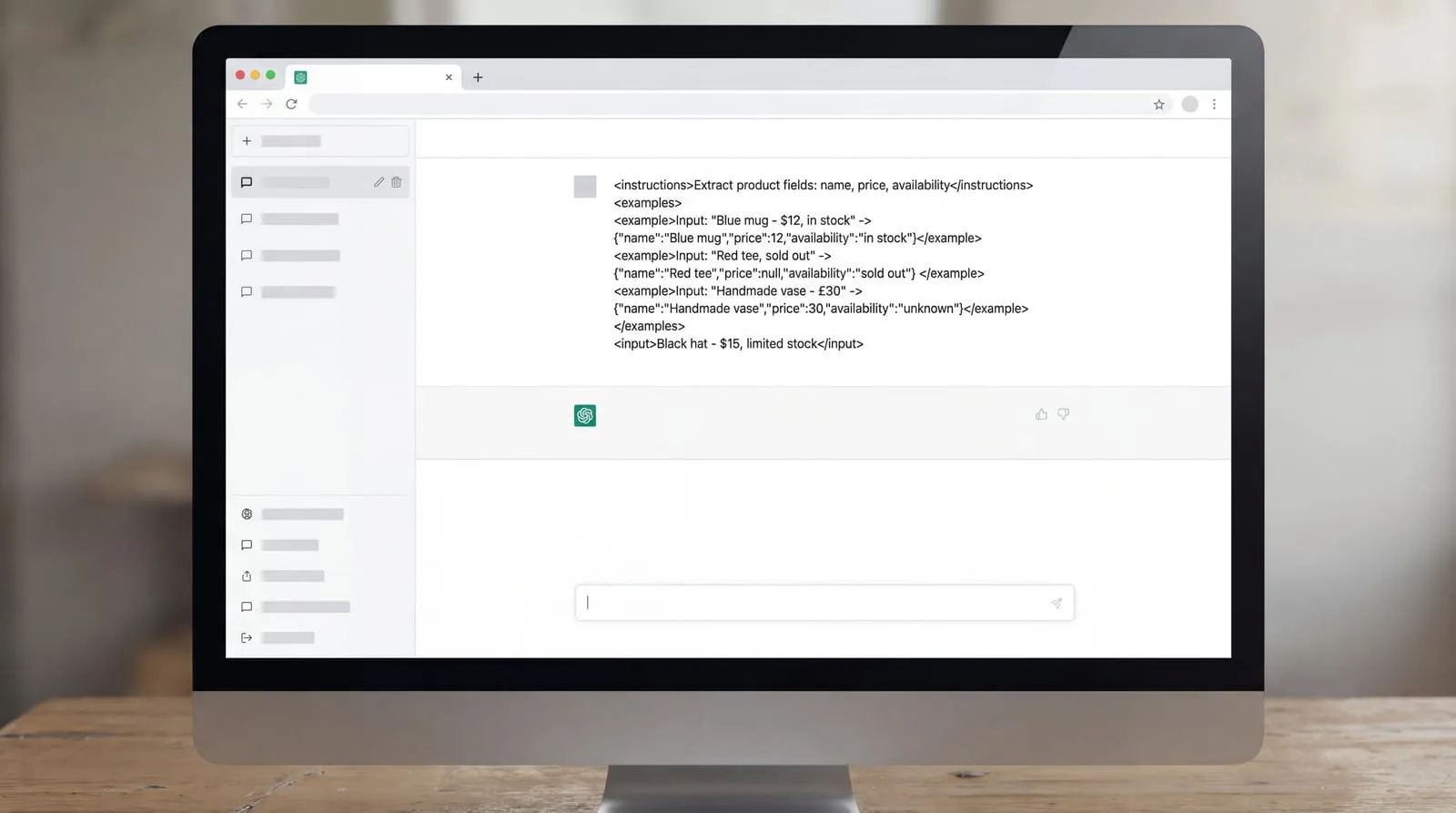
Anthropic’s best practices recommend using three to five relevant, diverse examples and wrapping them in <examples> with <example> items so the model copies the format and tone you want. Examples that mirror real cases and cover edge conditions do the steering; the tags keep them separate from instructions and the new input.
Google’s Gemini guide recommends including few-shot examples, experimenting with the number, and warns that too many can cause overfitting; clear examples can even replace some instructions. It also asks you to keep formatting identical across the examples, which we apply below in the formatting checklist. That page also explains what few-shot examples actually do: they are often used to regulate the formatting, phrasing, scoping or general patterning of responses. Models like Gemini can often pick up these patterns from a few examples, so start small, then adjust the count in tests before adding more.
Two practitioner guides add concrete selection rules you can apply today:
- LLMs Blog suggests covering each label at least once; for extraction, include one case with a missing field and one phrased oddly so the model learns how to handle gaps and ambiguity.
- Make examples look like the real inputs you will paste later: similar length, tone and messiness, not cleaned-up textbook cases.
- TeachYou Academy recommends three to six examples for style transfer or tone matching so the examples span the target style’s range.
From Google’s Gemini guide, formatting choices that keep outputs stable:
- Use stable labels in every example: the same field names, headings and answer labels, spelled the same way.
- Keep exact tag names identical across all examples, for instance <instructions>, <examples>, <example>, <input>.
- Match whitespace: the same line breaks, indentation and surrounding spaces where the answer begins and ends.
- Use one consistent example splitter between examples, and do not mix styles within the same block.
Keep examples short. Show the minimum text that proves the pattern and stops: one or two sentences for a classification, a compact before/after for rewriting, a tiny JSON for extraction. Short examples conserve tokens and keep attention on the new input, which is where errors matter.
Apply the scaffold you set in the previous section: place your 3 to 5 chosen examples together in one <examples> block, keep labels and tag names identical across them, then paste the new case in <input>. If the prompt approaches your token budget, trim examples first, starting with the ones that repeat a pattern already shown.
Where do examples fail, and what fixes work?
LLMs Blog reports that Min et al. (2022) found demonstrations mostly teach the label space, the kind of input to expect and the overall output format rather than facts. Zhao et al. (2021) showed that few-shot accuracy can swing with format and even the order of examples, with a bias toward answers near the end of the prompt or common in pretraining. Those findings were on 2020 to 2022 models, so treat them as cues to test your prompt rather than fixed expectations.
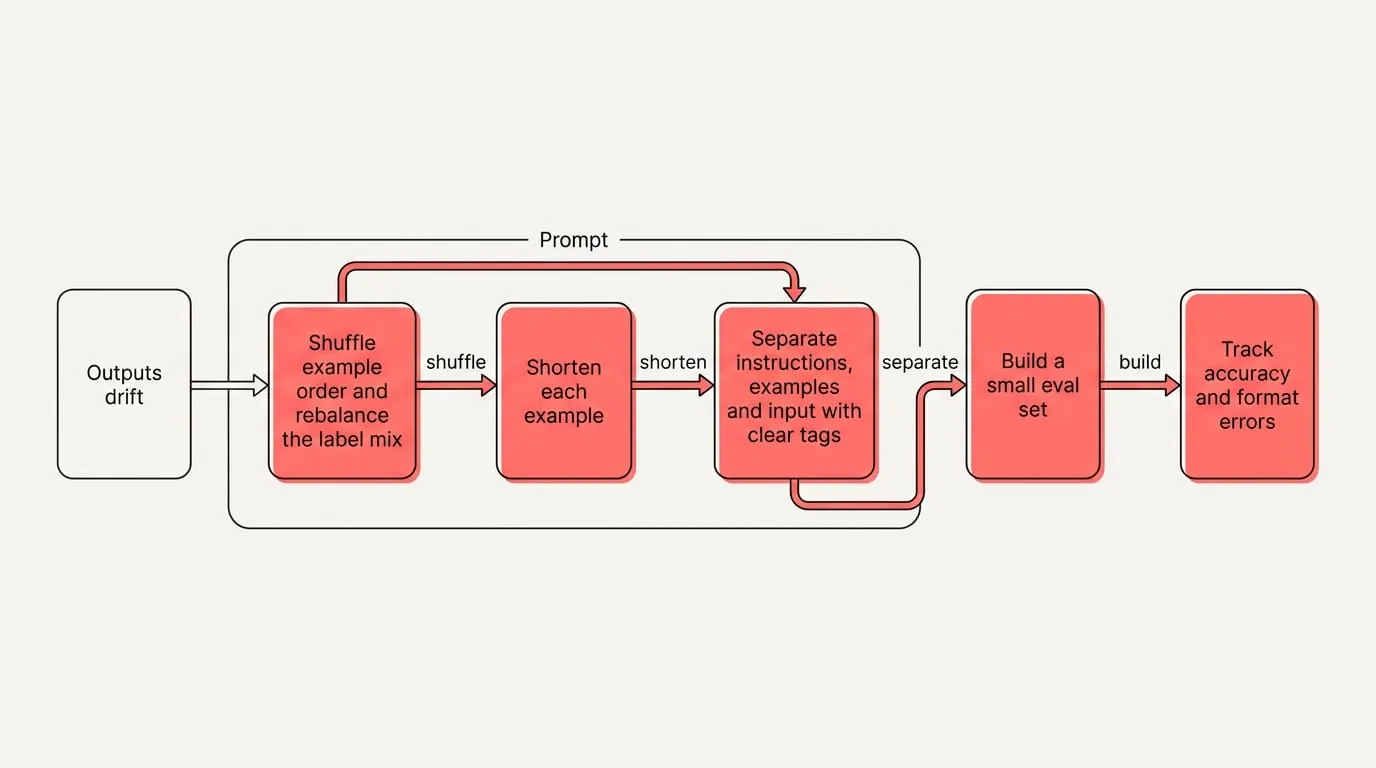
When outputs drift, overuse a label, or copy stray wording, run this quick mitigation loop:
- Shuffle example order and rebalance the label mix; compare runs on the same inputs.
- Shorten each example to the minimum that shows the pattern; remove filler.
- Separate instructions, examples and input with clear tags so parts cannot blur.
- Build a small eval set and track accuracy and format errors across 3 to 5 runs.
Use chain-of-thought only when the task truly needs multi-step reasoning, and expect extra verbosity and the risk of leaking details from examples into the answer. Anthropic’s best practices say explicit chaining still earns its place when you want to inspect the steps, even as current models handle much reasoning internally. LLMs Blog also reports that DeepSeek R1 found few-shot degraded its performance and recommends zero-shot prompts instead, so try a plain prompt before you add demonstrations.
Keep examples reusable across ChatGPT, Claude and Gemini
Standardize on one scaffold and one canonical example set you can reuse everywhere. Treat the examples as the source of truth and change only the count per run: raise it when you have room, lower it when context is tight. Keep outputs tagged, for instance wrap the required result in <answer>, so your parser does not depend on how each UI echoes markdown. Keep the canonical set outside the chat so you can reinsert it unchanged.
To reuse the same examples across ChatGPT, Claude and Gemini with NjectAI:
- Install the NjectAI Chrome extension and sign in to the web app.
- Create a context profile in the web app by answering the short interview, then add your scaffold to it as a file: <instructions>, the canonical <examples> block, and an empty <input>.
- Draft your request. Click Context Inject to stage your profile so it is appended after your message when you press send; or click Improve your prompt to rewrite your draft using the profile, then review and send.
Good examples, reused well
A compact set of concise, realistic examples can establish the labels, structure and tone you want. Consistency and coverage matter alongside count: each example should use the same tags, field names, spacing and answer shape, while the set covers cases that genuinely differ. Treat that set as a maintained prompt asset rather than rebuilding it inside each chat. Keep one canonical scaffold outside the conversation, insert the current input separately, and vary the example count when the task or context budget calls for it. Reuse the same version in ChatGPT, Claude and Gemini, then compare it on a small, stable evaluation set. Small tests reveal whether order, imbalance or stray wording is steering the output before you revise the examples.