
Claude Skills for repeatable workflows across tools
Learn when Claude Skills fit a repeatable workflow, how to build and test one, and how to keep its instructions consistent across AI tools.
Repeatedly explaining the same workflow costs time and invites small differences in format, checks and handling of missing information. Claude Skills give that recurring work a stable home, while leaving project background and personal preferences in the settings designed for them. The practical challenge is choosing the right layer, writing a clear SKILL.md and testing whether its description triggers as intended. Once the procedure is sound, you can also adapt it into a compact prompt template for tools that do not support Skills.
What is a Claude Skill, and when should you use it?
Claude Skills package one repeatable job in a folder you can reuse across chats and in Claude Code. Anthropic's documentation defines a custom Skill as a folder with a SKILL.md of instructions that Claude loads when a task matches the skill's description. You can also add optional files next to SKILL.md, such as references, templates and scripts, and point to each from the step where it is needed.
Craig Hewitt's Claude Playbook distinguishes project instructions from Skills: project context loads in every conversation inside that project, while a Skill is loaded only when relevant. Anthropic's Agent Skills overview describes Skills as loading on demand, with Claude matching your request to a Skill's description before reading its SKILL.md. Since Project instructions load every time but Skills load only when triggered, moving procedures into Skills cuts token overhead and keeps your background lean.
God of Prompt's comparison sums up when to use each:
| Item | What it is | When it loads | Best for |
|---|---|---|---|
| Skill | A folder with SKILL.md and optional scripts and reference files | Only when a task matches its description | One repeatable job, done the same way |
| Project | A workspace with its own files and standing instructions | Every chat opened inside that project | Ongoing work on one client, product or topic |
| Custom instruction | Standing preferences about tone and formats | Every chat, everywhere | How you like answers written, whatever the task |
| Saved prompt | A block of text you paste in when needed | Only when you paste it | A task you run by hand now and then |
The rule of thumb: if the same job shows up in more than one project, make it a Skill; if it belongs to one body of work, a Project; if it is about you rather than the job, use custom instructions; if you will do it only a couple of times, a saved prompt is enough.
Anthropic's documentation says good candidates are tasks you repeat and keep correcting the same way, including:
- A report format your team uses
- A review checklist with must-include checks
- A multi-step procedure with ordered steps
- Work that needs a reference file or a script to come out right
Create and validate your first Skill
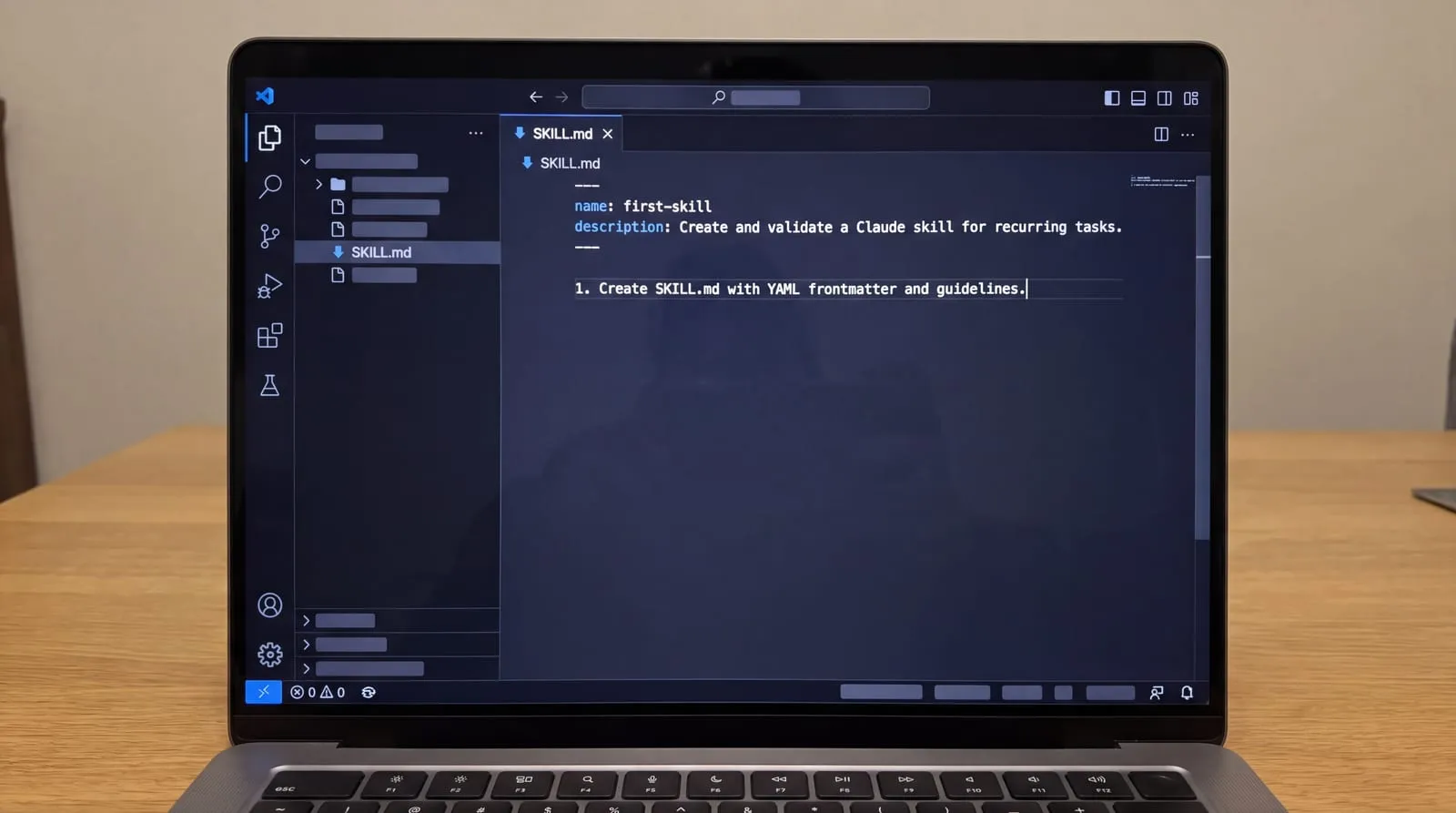
Every custom skill begins with a directory containing a required SKILL.md file. Anthropic's documentation requires that the file open with YAML frontmatter containing two mandatory fields: name and description. The name field permits lowercase letters, numbers, and hyphens only, up to a maximum of 64 characters, and it must match the enclosing folder name exactly. The description field accepts up to 1,024 characters, matching the limit set by the Agent Skills specification. Claude reads this description to determine when the skill applies, so you must clearly specify both what the skill does and the exact circumstances when it should load. Keep the main SKILL.md file under 500 lines, delegating detailed reference documentation to separate supporting files.
Write the body instructions below the frontmatter the way you would brief a careful colleague. A repeated manual briefing is the primary signal that a workflow belongs in a skill: whenever you find yourself explaining the same task to Claude three times by hand, turn that guidance into a reusable specification.
Structure the SKILL.md body around four core components:
- Numbered steps that guide Claude through the procedure in chronological order.
- An explicit output format defining the required structure, such as table columns or JSON keys.
- Instructions detailing how to handle missing inputs or incomplete data without guessing.
- One short worked example pairing a sample input with the desired output to anchor quality.
Because Claude reads the complete SKILL.md file whenever a skill activates, moving detailed background, file templates, and code into dedicated subdirectories keeps the skill lightweight. Keeping each supplementary file focused on a single responsibility prevents unnecessary content from consuming conversation context.
Add resources and code using standard directory conventions:
- Create optional folders beside SKILL.md: references/ for documentation Claude reads when called, assets/ for templates to copy or fill, and scripts/ for code.
- Mention each supporting file by path at the specific instruction step where Claude needs it so it opens only on demand.
- Write script invocation paths using ${CLAUDE_SKILL_DIR} so execution resolves reliably wherever the skill is installed.
- Keep scripts focused on deterministic tasks, avoiding hardcoded credentials and relying on external connectors when outside services are needed.
Testing verifies that Claude recognizes trigger conditions, loads instructions dynamically, and adheres to your specified output formats.
Follow these steps to activate and validate your skill:
- Compress the skill folder into a ZIP archive where the directory is at the top level, upload it, and turn the skill on under Customize in settings.
- Send test prompts that should trigger the skill, then inspect Claude's thinking process to confirm that it loaded the instructions.
- If Claude does not trigger when expected, refine the frontmatter description and adjust the procedural steps before retesting.
- Test after every significant edit by running the skill on a realistic task rather than assessing prompts in the abstract.
A short rough draft plus one rewrite beats an over-engineered prompt, because separating intent from syntax lets you iterate fast and keeps control when the conversation shifts.
How do Skills load and run across Claude?
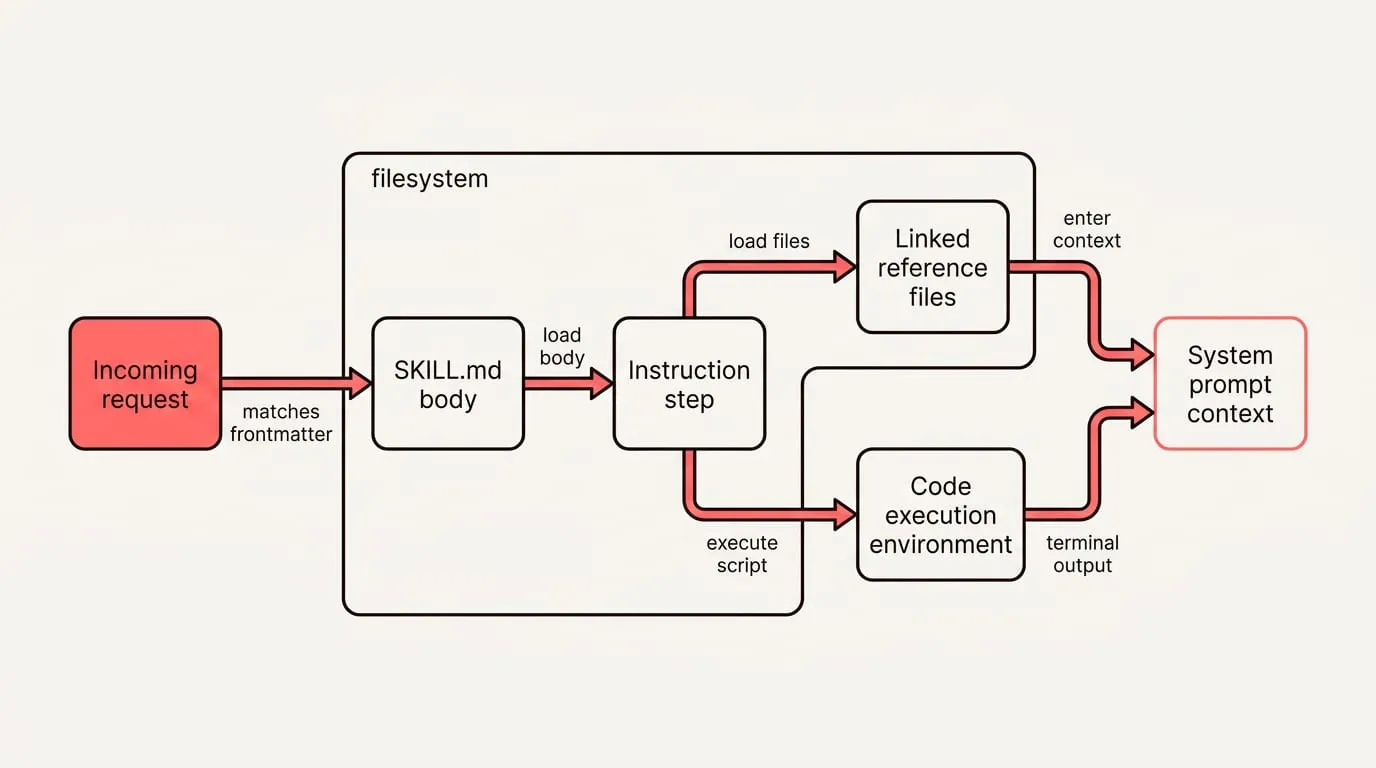
Anthropic documents progressive disclosure: Skill metadata loads into system prompt context at startup at approximately 100 tokens per skill. Claude reads the SKILL.md body from the filesystem only after an incoming request matches the frontmatter description, keeping prompt overhead under 5,000 tokens during execution. Linked reference files load only when an instruction step explicitly calls them, and scripts execute via bash in Claude's code execution environment so that only terminal output enters context. Because the underlying virtual machine provides filesystem access and command execution, you can bundle extensive reference materials and automated tools without paying upfront context penalties for unread files.
Anthropic also provides pre-built document Agent Skills for PowerPoint (pptx), Excel (xlsx), Word (docx), and PDF (pdf) files, which activate automatically when you work with documents. Custom Skills operate across Claude's product lineup: you can develop them in Claude Code, upload them through the API, or add them within claude.ai settings. However, custom Skills do not sync across surfaces automatically, meaning you must upload and manage them separately for each interface where your team works.
For persistent background information, keep your reference materials in a Project. Anthropic's guide describes Projects as self-contained workspaces featuring a 200K context window; when your uploaded documentation approaches capacity limits, Claude enables RAG mode to expand retrieval capacity by up to about 10 times. Reach for MCP connectors when you need live connections to external services, repositories, or databases, because MCP connects Claude to data while Skills teach Claude the procedures to process that data.
Keep instructions portable across tools
Anthropic's Claude Code docs say Claude Code skills follow the Agent Skills open standard, which works across multiple AI tools. Anthropic's Complete Guide says skills work identically across Claude.ai, Claude Code, and the API when the environment supports any dependencies the skill requires.
The three-step portable setup keeps your instructions and references consistent across tools with three repeatable steps:
- Put a short standing block in each tool's settings. If a tool lacks Skills, keep this block in account or project instructions, or use NjectAI context profiles to carry the same block across supported tools.
- Mirror the same projects and files in both. Keep the same task folders and reference files in each tool, so any templates, checklists or scripts you rely on are available by the same names.
- Run one labeled task prompt both can follow. Copy the SKILL.md description and steps into a compact prompt template that names the job, when to run it, the required output format and one short example; use the same label every time you run it.
Choose the right lever, then standardize
Consistency starts with separating procedure, background and preference. Put a repeatable method in a Skill, keep client or product material in its Project, and reserve custom instructions for standing preferences about how you want responses written. That separation makes the trigger easier to judge and keeps each layer focused on the job it is meant to do.
The durable asset is the instruction set, rather than any one interface. Keep the Skill’s description, steps, output format and example in a compact prompt template as well as SKILL.md. When another host lacks Skills, use that template with the same reference files and context you maintain there. You can then compare outputs and revise one shared specification instead of rebuilding the workflow for every tool.