
Prompt templates that travel across ChatGPT, Claude and Gemini
Build portable prompt templates for ChatGPT, Claude and Gemini, then store, test and adapt one master version without creating copies for every tool.
Rewriting the same instructions in ChatGPT, Claude and Gemini wastes time and lets small differences creep into the result. Prompt templates give you a stable starting point: reusable instructions with clearly marked inputs, constraints and output requirements. The practical aim is one master version that can move between assistants, with small platform notes instead of separate copies. A tool-agnostic library keeps that version searchable and reviewable, while NjectAI can attach recurring context in supported tools. This creates a workflow you can test, refine and reuse without rebuilding each prompt from scratch.
How do you write a reusable prompt template?
A durable prompt template delivers predictable outputs across tools by functioning as an operational spec. God of Prompt recommends organizing reusable templates into role and context, step-by-step instructions, output format and explicit constraints.
Every solid template relies on five structural components:
- Role: the persona, domain expertise and perspective the model should adopt.
- Background: audience profile, project facts and guidelines governing the work.
- Task or steps: direct action verbs organized as a numbered sequence of operations.
- Constraints: explicit boundaries such as exclusions, negative constraints, and tone rules.
- Output instructions: the exact target structure, including schemas, sections or field lists.
Variables turn static instructions into flexible workflows without creating maintenance friction. Choose 2 to 4 key variables for dynamic inputs and mark them consistently throughout your prompt. Pick one variable syntax and use it everywhere so the model never confuses fixed prompt instructions with swappable fields.
To keep variables maintainable across sessions:
- Select descriptive names like {audience_level} or {topic_scope} that clarify expected values.
- Standardize on a single delimiter pattern, such as double curly braces or square brackets.
- Keep variable declarations separate from fixed constraints so rules cannot be accidentally edited.
- Attach a sample value to each variable to document intended usage for your team.
Output variance causes repeated prompts to fail when models drift into conversational chatter. Structure responses into formats like bullet points, tables or JSON schemas and set measurable limits such as exact counts or word caps.
Define measurable output limits using these rules:
- Name the structural container, whether a markdown table, ordered list or JSON schema.
- State numerical boundaries directly, requesting exactly 5 bullet points or at most 150 words.
- Avoid subjective qualifiers like brief or thorough in favor of explicit limits.
- Provide explicit instructions on handling incomplete data before the model generates text.
- List expected table columns or data fields in order to guarantee repeatable schemas.
Examples guide output style far more effectively than abstract rules. Providing two or three few-shot examples allows the model to mirror your intended formatting and vocabulary without guessing. In your template instructions, direct the model to pause and ask clarifying questions whenever required user inputs are incomplete or contradictory.
Before putting a template into production, run a validation pass to ensure stability across inputs.
Follow this validation sequence to test and refine your template:
- Run test prompts using standard cases, edge scenarios and messy inputs filled with shorthand or typos.
- Verify that the generated response strictly follows your assigned output schema, length limits and formatting rules.
- Adjust one variable or constraint at a time, retesting against the same test cases to isolate performance impacts.
- Establish objective success benchmarks, such as formatting accuracy and length compliance, before making edits.
- Store the verified template alongside evaluation inputs to revalidate performance after future model updates.
Adapt one template across tools
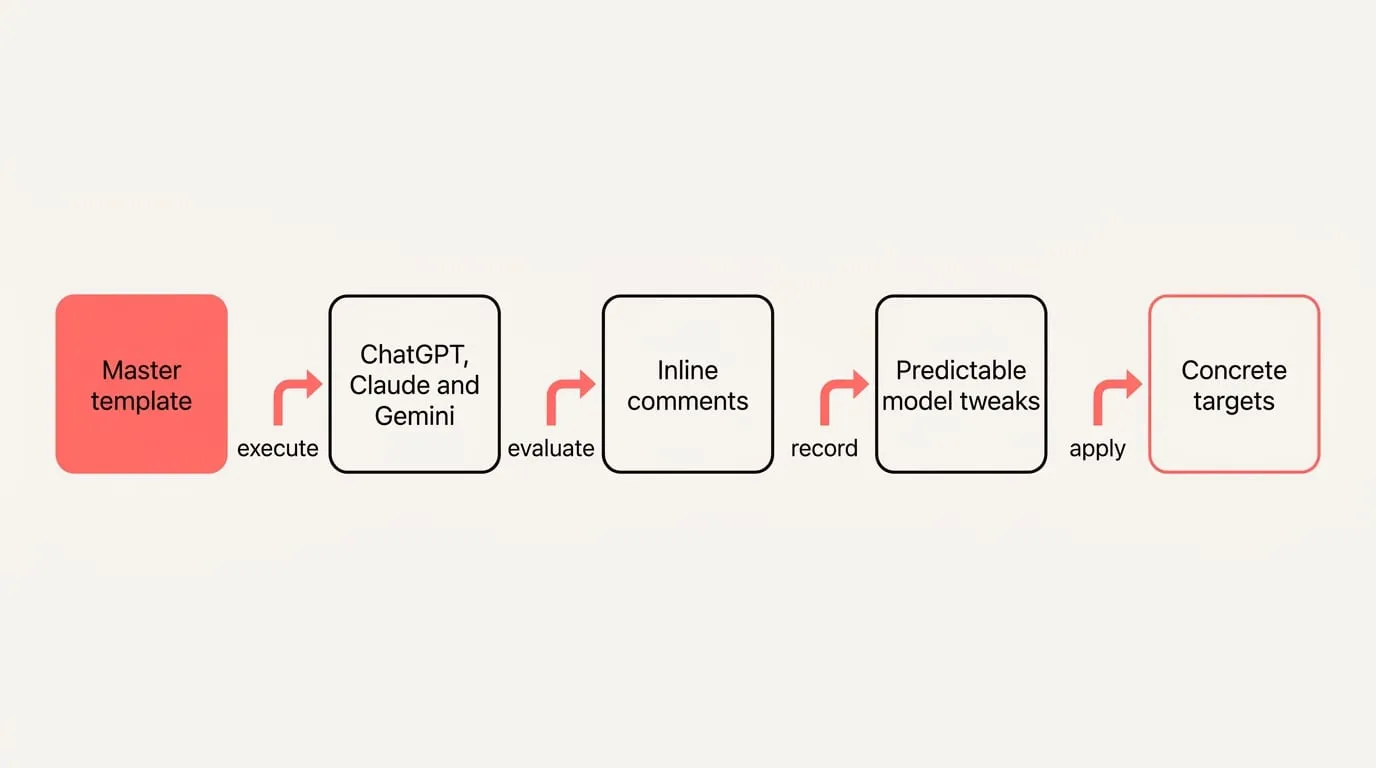
Authoring separate prompts for each assistant creates synchronization debt and version drift. Establishing durable cross-tool workflows requires maintaining a single tool-neutral master text while accommodating platform nuances through lightweight notes. Build an adaptable core rather than duplicating instructions.
Follow these steps to keep one template portable across tools:
- Write your master template in clean, tool-neutral markdown without vendor-specific markup.
- Execute the template across ChatGPT, Claude and Gemini to evaluate where baseline responses differ.
- Record minor per-platform adjustments as inline comments inside the master template rather than generating separate files.
- Avoid creating independent prompt copies unless two target workflows diverge fundamentally in scope.
Prompt Architects documented in 2026 that roughly 90 percent of well-structured prompts port cleanly across ChatGPT, Claude and Gemini without core changes, while the remaining 10 percent require modest, predictable adjustments. Because core prompting strategies carry over cleanly, you only need to manage minor syntax variations at paste time.
Apply these predictable model tweaks and character constraints when preparing to send:
- Claude: enclose complex multi-section inputs inside semantic XML tags such as context or instructions when structure needs reinforcement.
- ChatGPT: organize sections using clear markdown headings, and place standing voice instructions inside Custom Instructions to keep templates compact.
- Gemini: add explicit instructions directing the model to ground factual claims and provide source citations.
- Vendor limits: platform features enforce varying field caps, meaning you should keep a concise core template and verify current limits before deployment.
Output variance between assistants drops significantly when format and length are stated explicitly. Specifying concrete targets such as capping text under 150 words or prescribing an exact three-column table eliminates divergent default behaviors across models.
Where should you store prompt templates?
Woyable points out that your primary source of truth should reside in a tool-agnostic environment, as native AI platforms do not offer automated cross-tool library exports. Selecting the right storage architecture ensures your prompt repository remains durable regardless of changes to vendor features.
Evaluate these four common storage patterns based on your operational needs:
- Native vendor features: convenient for quick local chat access, but offer low portability outside the host ecosystem and require manual versioning.
- Notes applications: provide broad cross-device portability and straightforward search, though version control depends heavily on external features.
- Git repositories: store templates as plain markdown files with full commit histories and branch reviews, ideal for engineering teams.
- Snippet managers: enable immediate keyboard insertion into any browser window, but frequently lack multi-user collaboration controls.
A reliable prompt library balances structured governance with light administrative overhead so it remains dependable over time.
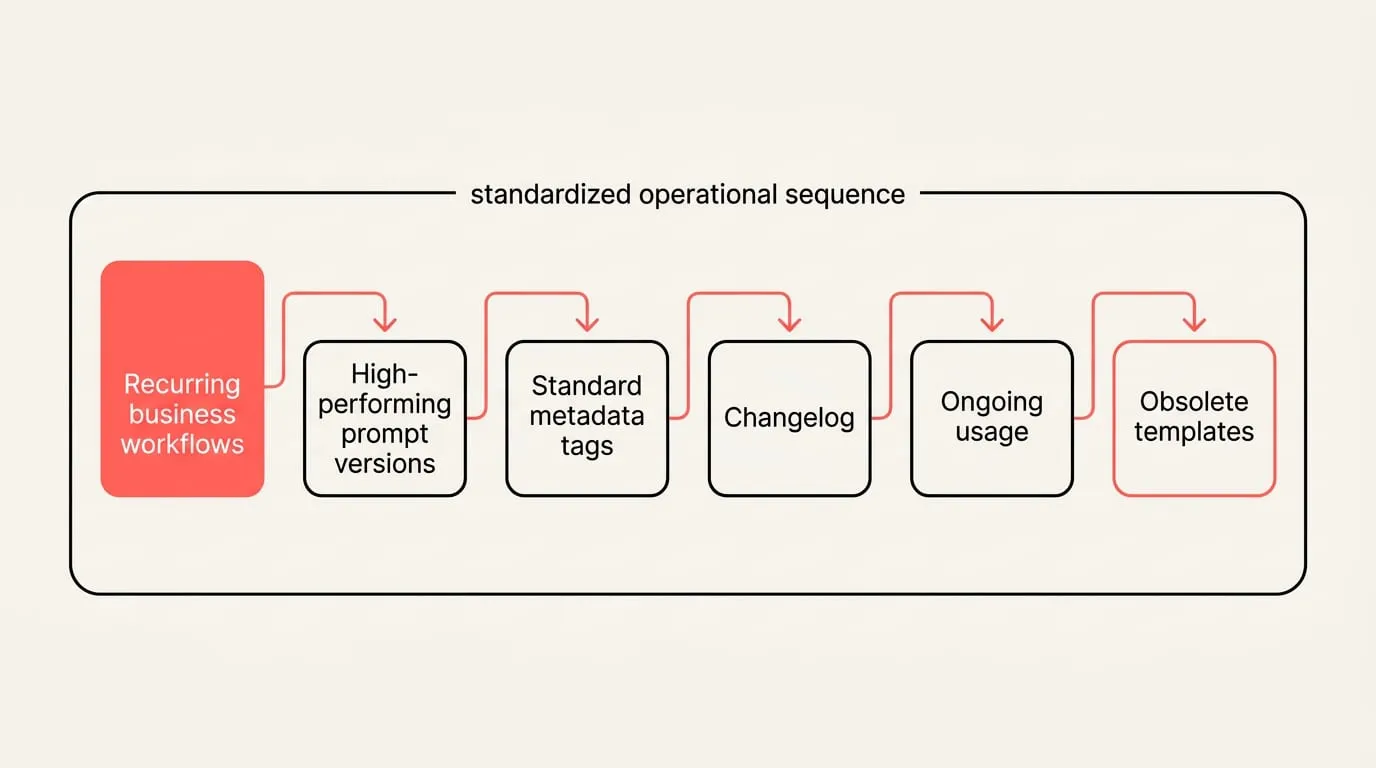
Establish your library using this standardized operational sequence:
- Catalog recurring business workflows and isolate the prompts currently used to complete them.
- Collect high-performing prompt versions and refine any prompts that regularly generate conversational pushback.
- Attach standard metadata tags to every entry, recording target model, functional role, output format, expected variables, author and update date.
- Track version changes in a changelog and retest critical prompts whenever an underlying model receives an update.
- Monitor ongoing usage across projects and archive obsolete templates that no longer see active deployment.
Effective prompt management converts messy conversation threads into durable assets without hoarding unnecessary prompt variations. Isolate reusable logic from project-specific details to keep the library clear.
Curate and refine your personal prompt library with these practices:
- Extract the final successful prompt text from your chat logs, remove session-specific details, add a concise goal summary, and assign an action-oriented name.
- Replace specific parameters with standard placeholders such as {{audience}} or {{tone}} to ensure adaptability.
- Name each template directly after the functional task it performs so it remains quickly searchable.
- Focus your repository on an initial foundation of 3 to 5 high-impact prompts before expanding your collection.
- Conduct regular maintenance passes, such as monthly reviews, to delete unused prompts and keep project-specific context outside template files.
Protect your team workspace and data privacy with these conflict and security protocols:
- Use a last-write-wins protocol for routine day-to-day edits where the newest change is presumed accurate.
- Apply explicit version tags like v2 or v3 to mission-critical templates before editing to prevent accidental overwrites.
- Designate an authoring computer as the single source for edits, or manually merge contradictory updates.
- Implement a strict two-library split: store generic templates with empty placeholders in cloud-synced storage, and retain customer data, credentials and proprietary documents in local-only environments.
Reuse templates with NjectAI context
NjectAI context profiles allow you to maintain a lean, portable template library while automatically attaching standing organizational background inside supported AI tools. By pairing your external markdown templates with saved context profiles, your core prompts remain clean while audience rules, brand tone and formatting expectations attach dynamically at send time.
To execute a portable prompt template using NjectAI in supported AI tools:
- Open your AI assistant in Chrome and choose the context profile containing the relevant background for your task.
- Copy your master prompt template from your library, paste it into the message input, and populate the dynamic variables.
- Review your instructions to ensure clear structural formats and numerical limits remain in place.
- Check total input length against the specific character limits of the target AI assistant, trimming optional context if needed.
- Apply any necessary per-platform syntax adjustment noted in your master template, then send the prompt directly.
Make one good template portable
Portability comes from separating stable instructions from changing inputs and platform details. A clear master template gives each assistant the same role, task, constraints and output target, while variables hold the details that change. Keep platform-specific syntax or length adjustments as short notes unless the workflows truly diverge. Store that master in a tool-agnostic library with names, metadata, version history and test cases that make changes visible. Keep customer data, credentials and other sensitive material outside shared template files by using empty placeholders instead. This setup reduces repeated drafting, limits version drift and makes output consistency easier to evaluate across ChatGPT, Claude and Gemini. Start with a small set of recurring tasks, then expand the library as tested templates prove useful.