
Claude vs Gemini for prose, code and Workspace
Claude vs Gemini compared for writing, research, coding, multimodal work and Google Workspace, how personalization differs and how to verify the choice with one controlled task.
The Claude vs Gemini decision rarely stays abstract for long. Each week, you may edit delicate copy, inspect a long report, change code, analyse media or work from files already in Google Workspace. The hidden cost appears when you repeatedly upload material, restate instructions and move results between tools. A better choice starts with workflow fit: which assistant handles a specific job with the least transfer work while preserving the context you need? One controlled run on your own material can turn a broad comparison into a defensible working default.
Where Claude leads and where Gemini leads
Use these defaults and cautions to choose the right model for everyday tasks:
- Writing and editing: Atlas Workspace recommends defaulting to Claude for careful prose, tone-sensitive editing and long-form restructuring; watch-out: when your drafting depends directly on live research or Google Docs context, switch to Gemini.
- Long documents and research: default to Claude when you supply files and want project knowledge to persist across chats; watch-out: for Search-led, cited reports that pull dynamically from the open web plus Drive or Gmail where available, use Gemini Deep Research.
- Coding: default to Claude for code review, refactoring, architecture discussion and multi-file changes; watch-out: if you are exploring an entire code folder or importing a GitHub repository, Gemini is useful where supported.
- Multimodal work: default to Gemini for images, video and broad file inputs; watch-out: verify accepted file formats, size limits and quotas on your specific account tier.
- Workspace tasks: default to Gemini when day-to-day work lives in Gmail, Docs and Google Drive; watch-out: actual access and behavior depend on your subscription tier, account type and administrator toggles.
Before relying on any Workspace-linked workflow, verify your subscription tier, account eligibility, activity settings and organization-level toggles. As Atlas Workspace notes regarding Google features, plan and administrator dependencies require verification before you commit to any workflow.
On multimodal tasks, Nesyona’s May 2026 head-to-head found Gemini won all three multimodal tasks and noted that Gemini handles native audio while Claude required a transcript. God of Prompt describes Gemini as Google’s flagship multimodal AI built into Workspace that handles text, images, audio, video and long documents natively. Independent tests align with the pitch: Gemini’s native multimodal design tracks with its wins on image and audio tasks.
On coding benchmarks, Nesyona reported that Claude won five of six coding tasks with one tie, often adding tests unprompted and handling cross-file changes more reliably, while Gemini was competitive on isolated snippets. God of Prompt describes Claude as built for serious reasoning, long documents and agentic coding with large context windows. Claude’s coding wins on cross-file changes echo its positioning as strong at agentic, whole-project code work.
When your team already lives in Google Workspace, working natively reduces transfer steps because files already sit in Docs, Gmail and Drive. HinterBuild notes Gemini is the path of least resistance in that setting, and side-panel drafting in Docs helps teams adopt the habit. Moving outside those tools requires uploading files and pasting copy between windows, which introduces friction to daily routines.
Projects and Gems: how personalization differs
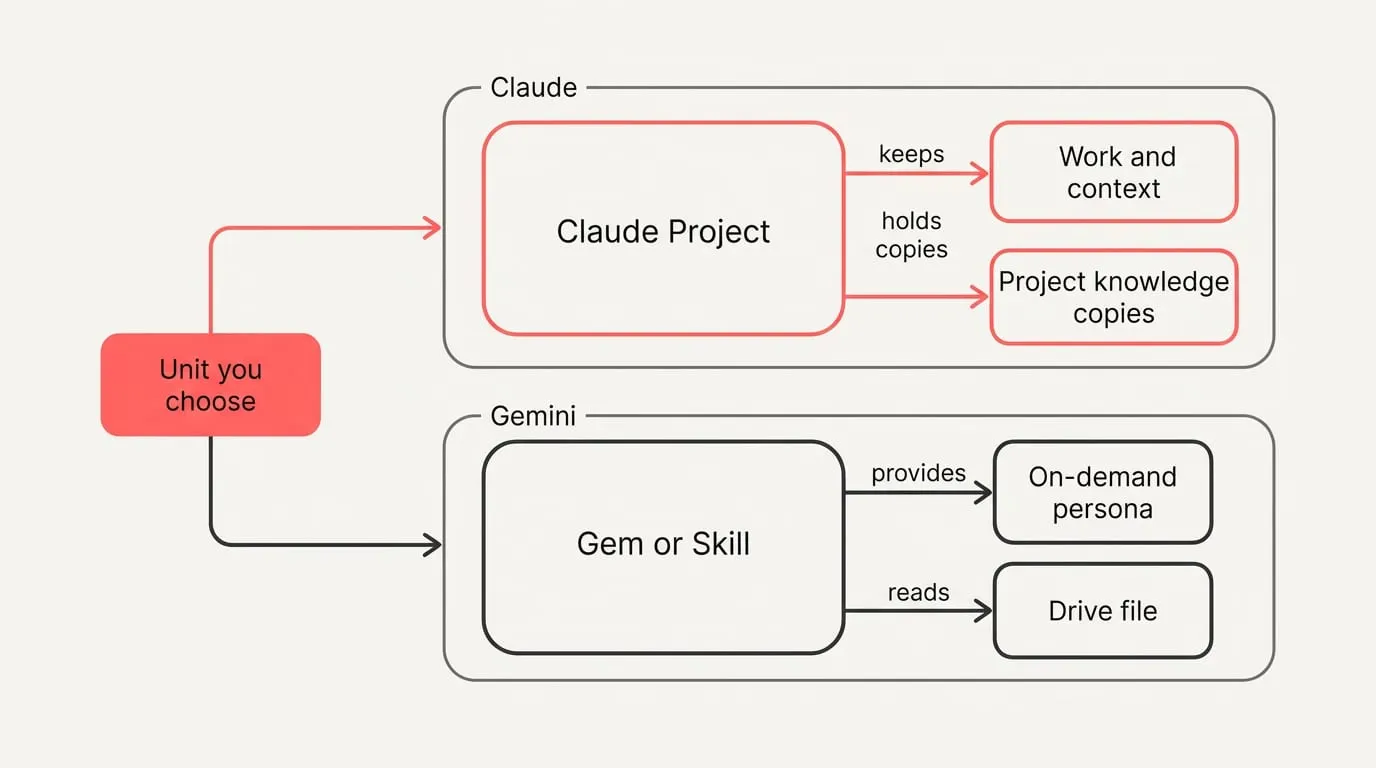
Fenbs explains that a Claude Project is a workspace scoped to one body of work where chats, knowledge, instructions and memory live together, while a Gemini Gem is a reusable assistant you pick when you want the same behavior across unrelated chats. Google’s migration turns Gems into Skills on personal accounts from November 2026, on Workspace business, enterprise and nonprofit from March 2027, and on education from June 2027. The unit you choose determines what travels with you: in a project, work and context stay together, whereas a Gem or Skill provides an on-demand persona across separate conversations.
Knowledge handling reflects this architectural difference. In Gemini, a Gem that uses a Drive file reads the current version and will cite the knowledge sources unless you disable citations. In Claude, a Project holds copies you replace when originals change; on paid plans, when project knowledge nears the context window, Claude switches to searching that knowledge instead of loading it verbatim, which can expand usable capacity by up to ten times. If your files update regularly in Drive and you need inline citations, Gems or Skills align naturally, whereas Claude fits a stable packet of reference documents.
Personalization scope also diverges across both tools. Claude’s memory is kept as editable Topics you can review and correct. The Gems help pages describe no Gem-specific memory. Skills act as reusable saved instructions you can stack when you need voice or formatting behavior across chats. Claude’s memory remains linked to a single project, whereas Gemini focuses on selecting modular instruction sets and referencing live files. Recurring work needs a stable context layer more than clever wording, because reused background, rules and links raise consistency across tools, while one-off phrasing tricks fade between chats.
How should you set them up?
To set up Claude for multi-session work and clearer outputs:
- Start a Project for work that will last more than one session so its instructions and files travel with every chat inside it.
- Put the real material in the conversation by pasting or attaching the docs the prompt will work on.
- Ask for an Artifact when the output is a document or code so you can edit and version the result.
- For analysis and multi-step problems, have Claude think before it answers; turn on extended thinking for deeper reasoning.
- When you work on a repository, run the same prompts in Claude Code from the terminal.
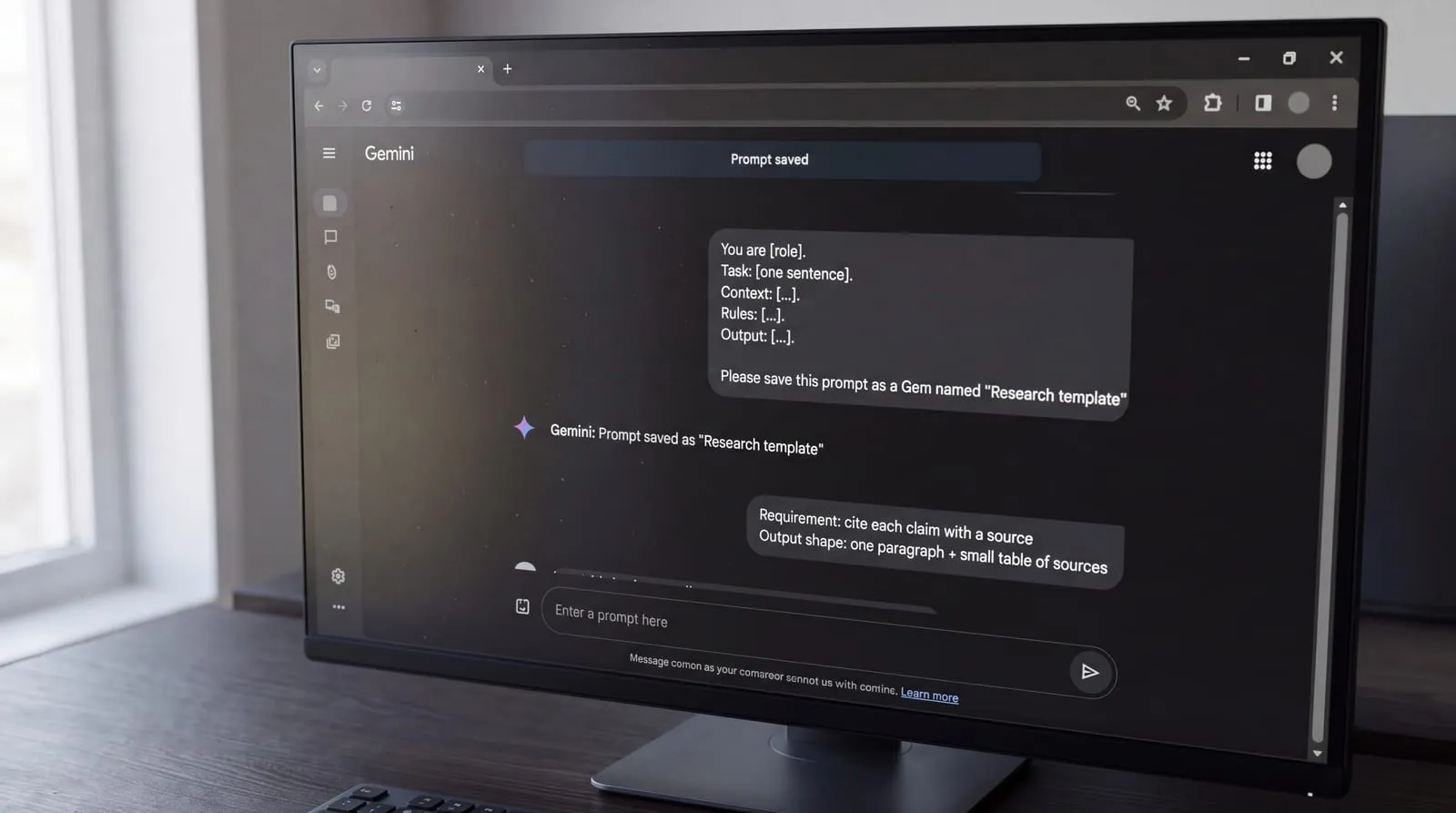
- Use a compact template Claude follows reliably: You are [role]. Task: [one sentence]. Context: […]. Rules: […]. Output: […]. Make the format the final line.
To set up Gemini for Google-connected work and reproducible prompts:
- Decide where the material is: in Workspace, name the file or email thread in the prompt; in the Gemini app, paste or attach it.
- Paste your prompt and state the shape of the answer you want, such as a table, five bullets or a one-page memo.
- For research, require that each claim shows its source.
- For images and video, keep one subject and style, name one light source, and make one change per follow-up.
- Save any prompt you reuse as a Gem so the instruction is ready next time.
- Use a repeatable research pattern: start with search; give a one-paragraph answer; then add a small table of sources with what each adds and how recent it is.
A short, verifiable choice method
Capability among leading assistants has converged, so prompt and workflow clarity now matter more than rankings. Run this one-task bake-off weekly:
- Pick one recurring job and write a short success checklist plus one measurable outcome.
- Freeze inputs: use the same brief, source files and constraints across both tools.
- Require citations for any factual claim and ask for inline quotes.
- Spot-check passages against those sources and mark unsupported lines.
- Note current plan limits and context figures before comparing runs, and date-stamp them.
- Log misses and needed edits, pick the default for that job, and rerun if tools update.
If you split roles, use NjectAI context profiles to carry your audience, rules and key facts into prompts in Claude and Gemini. The Chrome extension runs on the assistants’ pages and appends your chosen profile after your message when you press send, keeping context consistent across tools. Treat outputs as drafts until you have checked citations and source passages. State preferred sources and depth explicitly when you research with AI, because naming where to look and how deep to go reduces hallucination and mismatched formats.
Prove your choice on one real task
Choose at the level of the job, because no single headline ranking captures the value of careful editing, repository work, multimodal inputs and Workspace access in the same way. Use one recurring, verifiable task to compare the assistants with identical inputs, explicit success criteria and checked sources. The result gives you a practical default for that job rather than a permanent verdict on either product. If Claude and Gemini win different parts of your week, a split setup is reasonable. Keep live or authoritative files in the system where they are maintained, and carry reusable audience details, rules and key facts into each assistant. That reduces transfer work without forcing every task through the same tool. Recheck the choice when your work, plan access or the products change.